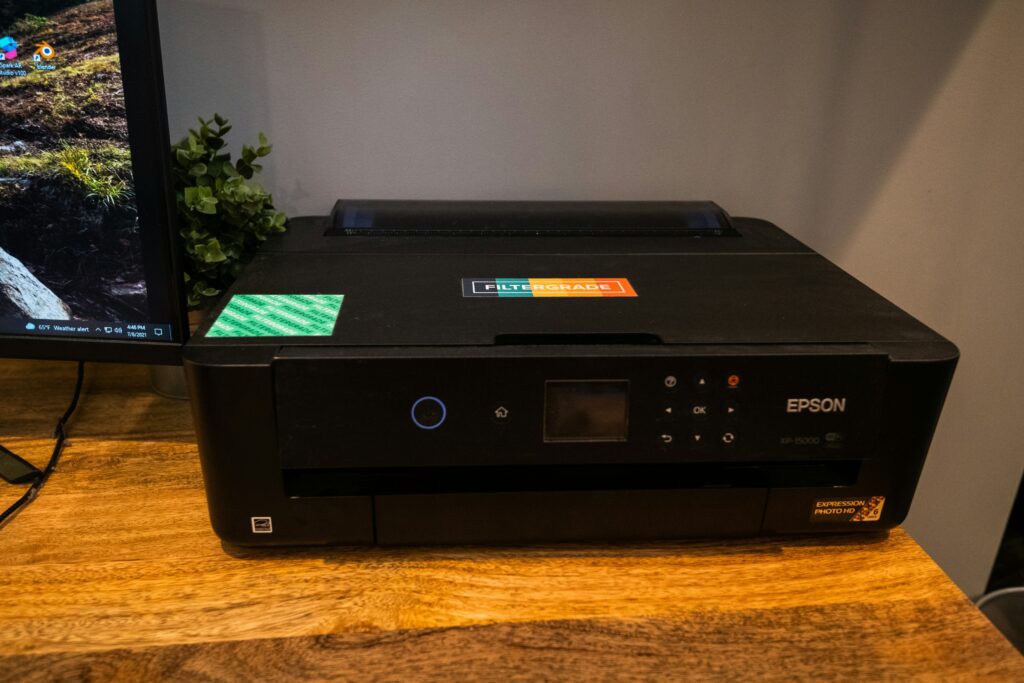
The Epson ET-8550 sits in one of the most interesting and contested positions in the consumer photo printer market. It is a wide-format EcoTank printer capable of printing up to 13×19 inches, with a scanner included, at a running cost that undercuts every pigment-based competitor by a significant margin. This review covers everything you need to know about the ET-8550, from setup and print quality to ink usage, paper compatibility, known issues, and how it compares to its main competitors.
Epson ET-8550 Overview
The Epson EcoTank Photo ET-8550 is a wide-format all-in-one inkjet printer designed for photo printing at home. It uses Epson’s EcoTank system, which replaces traditional ink cartridges with refillable ink tanks that hold significantly more ink and cost considerably less per milliliter than cartridge-based systems.
The printer uses a six-color ink set: cyan, magenta, yellow, black, gray, and photo black. This combination, which includes both dye-based and pigment-based black inks, allows the printer to handle both everyday document printing and high-quality photo printing from a single machine.
Its maximum print size of 13×19 inches (A3+) makes it suitable for professional-quality large prints that most home printers cannot produce. The integrated scanner adds versatility that strictly photo-oriented printers lack.
Key Specifications
- Print technology: Inkjet with PrecisionCore Micro TFP print head
- Maximum print size: 13 x 19 inches (A3+)
- Ink system: EcoTank with 6 refillable ink tanks
- Ink colors: cyan, magenta, yellow, black, photo black, gray
- Maximum print resolution: 5760 x 1440 dpi
- Scanner: flatbed CCD scanner, 1200 dpi optical
- Connectivity: Wi-Fi, Wi-Fi Direct, USB, Ethernet
- Paper handling: rear tray and cassette, accepts up to 1.2mm thick media
- Dimensions: 22.1 x 12.2 x 8.5 inches (folded)
- Weight: approximately 21.4 lbs
- Compatible operating systems: Windows and macOS
Who Is the ET-8550 For?
The ET-8550 fills a specific and well-defined need. It is built for people who want high-quality wide-format photo printing at home without the ongoing cost burden of cartridge-based printers.
The ideal ET-8550 user is a photographer, artist, or serious hobbyist who wants to print their own work at sizes up to 13×19, needs the flexibility to produce prints on demand without relying on external print services, and values the ability to iterate and refine prints without the cost anxiety that comes with expensive ink cartridges.
It also appeals to users who want a single machine for both photo printing and everyday office tasks. Having one printer that handles greeting cards, art fair prints, documents, and scanning without separate machines is genuinely convenient for a home office setup.
It is not the right choice for photographers who require the absolute maximum in color gamut and archival longevity and are willing to pay significantly more for pigment-based printing. For those users, the Epson P900 or Canon Pro-1000 are more appropriate.
Epson ET-8550 vs Competitors
ET-8550 vs Epson P900
The P900 is Epson’s flagship 13-inch wide format photo printer using UltraChrome HD pigment inks in a 10-color system. Print quality and color gamut are superior to the ET-8550, particularly in the reproduction of orange and purple tones and in extremely subtle shadow gradations.
The P900 costs significantly more upfront and uses expensive ink cartridges. For high-volume printers, the per-print cost is manageable, but for occasional printing the cost per page is much higher. The P900 also has no scanner and no document printing capability. If archival gallery-quality output is the primary requirement, the P900 wins. If total cost of ownership and versatility matter more, the ET-8550 wins.
ET-8550 vs Canon Pro-1000
The Canon Pro-1000 is a professional 17-inch pigment printer with 12 ink channels. It is in a different class in terms of print size capability and maximum quality, but it is also dramatically more expensive to buy and operate. It is primarily a dedicated photo printer with no scanning or document capability. The ET-8550 is not competing directly with this machine.
ET-8550 vs Canon Pro-200
The Canon Pro-200 is a closer competitor, being a dye-based 8-color printer capable of 13×19 inch prints. Print quality is very good and the 8-color system gives it a slight advantage in color accuracy over the ET-8550’s 6-color setup. However, it uses ink cartridges rather than a tank system, making ongoing ink costs higher. It also lacks a scanner. For pure photo output quality, the Pro-200 is competitive. For overall cost efficiency and versatility, the ET-8550 has the edge.
ET-8550 vs Epson ET-8850
The ET-8850 is the newer version of the ET-8550 with improved connectivity features including AirPrint support and additional paper cassettes. Print quality is essentially identical. If you are buying new and the price difference is small, the ET-8850 offers modest convenience improvements. The ET-8550 remains an excellent choice if available at a lower price.
Setup and Installation
The ET-8550 is straightforward to set up. Epson has designed the unboxing and initialization process to be intuitive, and first-time printer setup rarely causes problems.
The initial ink filling is the most distinctive part of the process. Each of the six ink bottles has a cap designed to fit only into the matching tank, preventing accidental mixing. The filling process is clean and well-designed. Epson includes enough ink in the initial bottles to fill the tanks with some leftover, so you do not start with empty tanks after the initialization process consumes some ink.
Physical footprint is reasonable. When folded, the printer is compact for a wide-format machine. The paper tray extends automatically when printing and retracts with a button press, which helps maintain desk space when the printer is not in use.
The printer operates via both wired and wireless connections. Wireless is convenient and works reliably for most users. A wired USB or Ethernet connection provides more stability if wireless dropouts are a concern, though these are uncommon in normal home network environments.
One important installation step that is easy to miss: install the Epson Print Layout software separately. It is not automatically installed with the standard driver package and is essential for serious photo printing work.
Print Quality: Color and Black and White
Color Print Quality
Color print quality from the ET-8550 is very good and will satisfy most photographers and artists. The combination of six ink colors produces smooth gradations and vibrant output on compatible media. Skin tones, blue skies, and complex landscape colors render well with minimal adjustment needed when using a good ICC profile.
The limitation of the 6-color system shows in certain specific color ranges. Some oranges and particular purple tones fall slightly outside the printer’s gamut when using certain paper combinations. These are subtle differences that require close inspection to identify, but users with critical color accuracy requirements should be aware of the limitation. Comparing prints from an ET-8550 with a 10-color pigment printer side by side reveals these differences more clearly than any single print would suggest.
The gray ink channel is central to color quality as well as black and white output. It provides smooth color transitions and subtle tonal work in color images. This is the ink that depletes most quickly during both color and monochrome printing.
Black and White Print Quality
Black and white output from the ET-8550 is good but comes with the characteristic limitation of dye-based ink systems: a slight color cast that varies with lighting conditions. The cast is most noticeable under warm or cool light and less visible under neutral daylight illumination.
The Advanced Black and White mode in Epson Print Layout is the recommended approach for monochrome printing rather than using a standard ICC profile. ABW mode gives the user direct control over tonal characteristics, warm or cool tone, brightness, and contrast within the software, producing more predictable and often superior results compared to color-managed printing. For fine art monochrome work, this mode is essential.
Ink System: EcoTank Costs and Refilling
The EcoTank system is the most compelling practical advantage of the ET-8550 over cartridge-based competitors. Each refill bottle contains enough ink to produce hundreds of prints at standard sizes. The per-milliliter cost of EcoTank ink is dramatically lower than cartridge ink of equivalent quality.
In real-world use, printing a mixed workload of photo prints, greeting cards, and occasional documents, the ink tanks last for a very long time. Users regularly report printing 150 to 200 5×7 prints before needing to refill any tank. The gray ink, which is used in both color and monochrome printing for smooth tonal transitions, typically depletes first and is generally available as a standalone bottle.
The practical result of this ink economy is a fundamental change in how you approach printing. Paper quality becomes the primary cost variable rather than ink. This allows for more experimental printing, more test prints, and greater willingness to iterate until a result is exactly right.
Some ink is consumed during initialization and head cleaning cycles. Pigment printers typically consume more ink during cleaning than the ET-8550. If you print infrequently, the ET-8550’s lower cleaning ink waste is an additional advantage.
Print head clogging can occur if the printer sits unused for extended periods. Most users who print at least occasionally, even small test prints weekly, report no clogging issues. The printer performs maintenance automatically when powered on after periods of inactivity.
Best Paper for the Epson ET-8550
Paper choice is arguably more important than any other variable in determining the final quality of ET-8550 prints. The printer produces excellent results with the right papers and mediocre results with incompatible ones.
Epson Pro Lustre
Epson’s own Pro Lustre paper is the natural starting point and produces excellent results with minimal ICC profile adjustment needed. It is the paper used in Epson’s own longevity testing for the printer and the combination that produces the best documented archival performance. For photographers new to the ET-8550, starting with Epson Pro Lustre establishes a reliable baseline.
Red River Paper
Red River Paper produces a wide range of media specifically compatible with the ET-8550 and provides high-quality ICC profiles for each paper. Their Aurora White 260 GSM and the warmer Aurora Natural variant are particularly well-suited to fine art photography work. The slight texture of these papers complements detailed landscape and nature imagery. Red River’s sample paper packs are the most practical way to find compatible papers without committing to full-size sheets of multiple options.
Epson Velvet Fine Art
Epson Velvet Fine Art paper produces outstanding results with the ET-8550. The textured surface sits between smooth lustre papers and heavily textured fine art papers, working well with a wide range of subjects. Color output is rich and the texture adds a painterly quality without overwhelming the image. The main limitation is the restricted range of available sizes compared to other Epson fine art papers.
Hahnemuhle Papers
Hahnemuhle fine art papers produce good results in some cases but are more prone to the pizza wheel marking issue on their coated and semi-gloss variants. The William Turner 190 GSM in its lighter weight performs well and is less susceptible to marking than heavier Hahnemuhle options. If Hahnemuhle papers are important to your workflow, test each specific paper for marking before committing to large quantities.
Papers to Approach with Caution
Heavily coated semi-gloss and gloss fine art papers with soft Baryta-style coatings are most prone to pizza wheel marking. Photo matte papers can produce adequate results but typically require more adjustment than lustre or fine art alternatives. Budget papers without available ICC profiles will produce inconsistent results regardless of adjustment effort.
A practical workflow tip regardless of paper type: use 4×6 test prints to verify settings, color balance, and paper compatibility before committing to full-size sheets. The ink cost saving makes test printing essentially free, and it prevents wasting expensive fine art paper on prints that need adjustment.
Epson Print Layout Software
Epson Print Layout (EPL) is a free software application that provides professional-level print control for the ET-8550. It functions as a standalone application and as a plugin for Adobe Photoshop and Lightroom, which is how most serious users will access it.
EPL handles ICC profile selection, color management, paper type selection, and print layout with more control and reliability than printing directly from a photo editing application. The Photoshop plugin integration is particularly convenient, accessible from the File menu under Automate after installation.
The Advanced Black and White mode within EPL gives direct control over monochrome output characteristics without requiring a separate ICC profile. Parameters including tone, brightness, and contrast can be adjusted within EPL for fine-tuning black and white prints.
The main limitation of EPL is that it does not allow direct image editing within the software. If a print requires adjustment to brightness, color, or contrast, the user must return to Photoshop or Lightroom, make the change, and re-send the image to EPL. This is a minor workflow friction rather than a fundamental problem, but it is worth knowing before you expect EPL to replace your editing workflow.
Known Issues and Annoyances
Pizza Wheel Marks
The most significant recurring complaint about the ET-8550 is pizza wheel marks: faint indentations on the print surface left by the paper-feeding rollers. These marks appear primarily on heavier fine art papers with soft or delicate coatings, particularly papers with Baryta-style finishes and some semi-gloss heavy art papers.
The marks are subtle and require a specific viewing angle under raking light to see clearly. They are most prominent on glossy surfaces. Under glass in a frame they are generally invisible.
The thick paper setting in the printer menu reduces but does not eliminate the issue. Users who require papers susceptible to this marking should test before committing to production quantities. The issue effectively restricts certain paper choices, which is a genuine limitation.
Wireless Connection Drops
Some users report that the printer loses its wireless connection when it has been in sleep mode for an extended period. Restarting the printer resolves the issue quickly, but it is an interruption when you simply want to print. This issue appears to vary between network environments and is not universal. A wired connection eliminates it entirely.
Gray Ink Availability
The gray ink is the first to need replacement and is sometimes less readily available as a standalone bottle compared to the other ink colors in the set. Stocking an extra bottle when you see it available is a practical precaution.
No Direct Image Adjustment in EPL
As noted in the software section, EPL cannot make image adjustments directly. Users who want to tweak brightness or color must return to their editing application. It is a minor workflow issue but can feel disruptive mid-printing session.
Print Longevity and Archival Quality
Print longevity was historically the main concern with dye-based inkjet printers. Earlier dye inks faded significantly faster than pigment alternatives. The ET-8550’s dye ink formulation represents a significant improvement over older dye systems.
Accredited laboratory testing by Wilhelm Imaging Research has shown that ET-8550 prints on Epson Pro Lustre paper are expected to remain stable for decades without any glass protection and for close to a century when displayed under glass. These figures are based on accelerated aging tests that simulate real-world light exposure conditions.
For photographers selling prints at art fairs or displaying work professionally, these longevity figures are reassuring. They position the ET-8550’s output in a range comparable to many pigment systems for typical display applications.
Longevity figures vary significantly by paper choice. The Epson Pro Lustre figures represent the best tested combination. Other papers may perform differently, and it is worth checking manufacturer longevity data for any paper you plan to use for prints that will be sold or displayed long-term.
Pros and Cons
Pros
- Extremely low running cost compared to all cartridge-based competitors
- Wide format 13×19 printing capability at consumer price point
- All-in-one functionality with flatbed scanner for document and photo work
- Excellent color print quality for a 6-color dye system
- Compact footprint for a wide-format printer
- Easy setup and intuitive ink filling process
- Good print longevity on compatible papers when displayed under glass
- ABW mode provides good control over monochrome output
- Lower ink waste during cleaning cycles compared to pigment printers
Cons
- Pizza wheel marks on some fine art papers with delicate coatings
- Slightly limited color gamut compared to multi-color pigment systems
- Slight color cast in black and white prints under non-neutral lighting
- Wireless connection can drop after extended sleep periods
- Gray ink depletes faster than other colors and availability can vary
- EPL software lacks direct image editing capability
Final Verdict: Is the Epson ET-8550 Worth It?
The Epson ET-8550 is one of the most compelling photo printers available for home use in its price category. The combination of wide-format capability, EcoTank ink economics, all-in-one functionality, and genuinely good print quality makes it a strong choice for photographers and artists who want to produce their own prints without committing to the higher cost and narrower functionality of professional pigment printers.
It is not perfect. The pizza wheel marking issue limits certain paper choices. The color gamut cannot match a 10-color pigment system. Black and white output requires care to manage the color cast effectively.
But for the user who wants to print their own work at sizes up to 13×19, control the output quality themselves, experiment with fine art papers, and do all of this without the running cost anxiety that comes with cartridge-based printing, the ET-8550 delivers on its core promise extremely well. After extended real-world use printing greeting cards, gallery pieces, and fine art papers, the fundamental verdict is consistent: it does what it promises, and it does it well.
Frequently Asked Questions
Is the Epson ET-8550 good for photo printing?
Yes. The ET-8550 produces very good photo print quality, particularly on lustre and fine art papers with a compatible ICC profile. Color output is vibrant and smooth. The main limitations compared to professional pigment printers are a slightly smaller color gamut in specific orange and purple ranges and a color cast in black and white prints under non-neutral light. For most photographers and artists, these limitations are acceptable trade-offs for the significant cost advantages.
How much does it cost to refill the Epson ET-8550 ink tanks?
The EcoTank refill bottles cost approximately 10 to 15 dollars each and contain enough ink to print hundreds of photos at typical sizes. This makes the per-print ink cost dramatically lower than cartridge-based printers of similar quality. The gray ink tends to deplete first and is available as a standalone bottle.
What is the maximum print size for the Epson ET-8550?
The ET-8550 prints up to 13×19 inches (A3+ format). This allows printing of 12×18 inch photos, panoramic images, and other large format work that most home printers cannot accommodate.
What causes pizza wheel marks on the Epson ET-8550?
Pizza wheel marks are indentations left by the paper-feeding rollers on the print surface. They appear most on heavier fine art papers with soft or delicate coatings, particularly papers with Baryta-style finishes. The marks are most visible on glossy surfaces and under raking light. Under glass in a frame they are generally not visible. Enabling the thick paper setting reduces the occurrence but does not eliminate it entirely.
How does the Epson ET-8550 compare to the ET-8850?
The ET-8850 is the successor to the ET-8550, offering improved connectivity features including AirPrint support and an additional paper cassette. Print quality from both printers is essentially identical as they use the same print head and ink system. The ET-8850 offers minor convenience improvements. If the ET-8550 is available at a meaningfully lower price, it remains an excellent choice.