
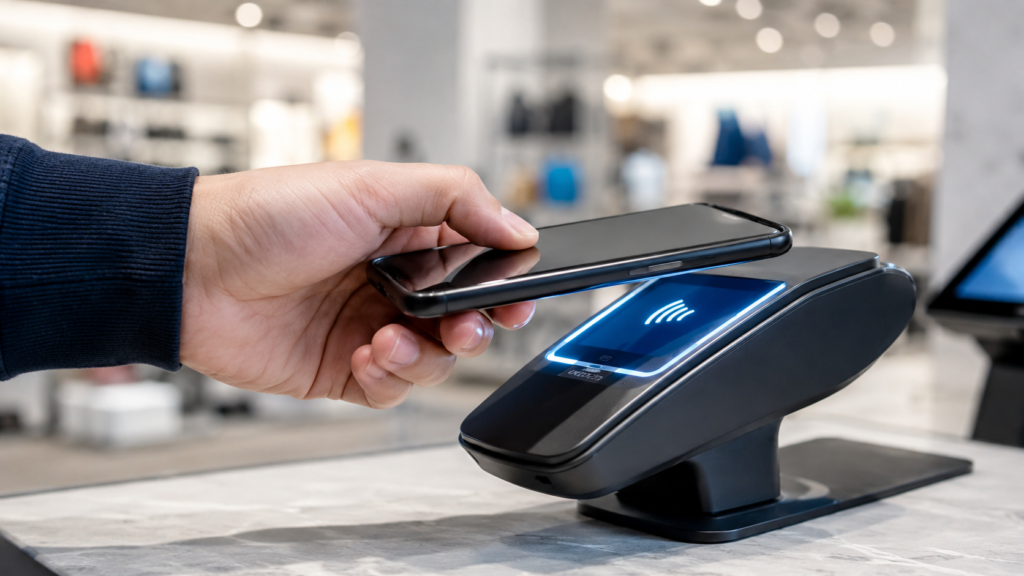
Digital wallet news moves fast right now. Card networks are striking new deals to make wallets work in more places, security researchers keep finding fresh angles that scammers try to exploit, and most people still aren’t sure whether tapping their phone at checkout is actually safer than swiping a card. This guide covers what’s actually changed recently, whether Google Wallet and Apple Pay are safe to use, and how to set one up and use it without guessing.
What’s Actually Happening in Digital Wallet News Right Now
The biggest recent shift is interoperability. In December 2025, Mastercard announced a global partnership with TerraPay that lets digital wallet providers — mobile money apps, fintechs, and banks — connect through TerraPay’s Xend platform and route transactions into Mastercard’s network. In practice, wallet users in the partnership’s coverage areas can tap to pay at more than 150 million Mastercard acceptance locations worldwide without carrying a physical card. Visa has been making similar moves, partnering with BBVA in Spain, Klarna, and Vipps Mobile Pay in the Nordics, plus a planned 2026 pilot with the Italian payments product Bancomat.
Why does interoperability matter this much? Digital wallets have historically been strongest in emerging markets, where mobile money apps are common but usable mostly within a closed network — you could pay other users of the same app, but not necessarily a merchant on a different network. Deals like Mastercard-TerraPay target that gap directly, turning wallets that only worked inside one ecosystem into something closer to a universal payment method.
On the usage side, mobile wallets keep climbing. In-store use has grown noticeably year over year, and adoption skews younger — close to half of millennials report using a mobile wallet within the past week, according to PYMNTS Intelligence research. More usage also brings more attention from fraud and security researchers, which is the other half of what shows up in digital wallet news: reports on new phishing tactics, deepfake-driven identity fraud during wallet sign-up, and pushes from card issuers to tighten authentication. None of that means digital wallets are getting less safe — it usually means more people are watching them, which is exactly what you’d want as adoption grows.
What Is a Digital Wallet, Exactly?
A digital wallet — also called a mobile wallet or e-wallet — is an app that stores payment information digitally so you can pay with your phone, watch, or browser instead of a physical card. Google Wallet, Apple Wallet, Samsung Wallet, PayPal, Cash App, and Venmo are all digital wallets, even though people use them differently.
Most digital wallets do at least one of three things:
- Store your credit or debit cards so you can tap to pay in stores or check out online
- Store non-payment items — boarding passes, event tickets, loyalty cards, transit passes, even a driver’s license or state ID in supported states
- Hold and move actual money, the way Cash App, Venmo, and PayPal balances work
Google Wallet and Apple Wallet mostly do the first two. Cash App, Venmo, and PayPal do all three, which is part of why people use terms like “digital wallet,” “digital pay,” and “mobile payment app” almost interchangeably for the same broad idea.
How Digital Wallets Actually Work: Tokenization and NFC
The technology that makes digital wallets work is tokenization, and it’s the reason wallets are generally considered safer than the mag-stripe or chip card sitting in your physical wallet.
When you add a card to Google Wallet or Apple Wallet, the app doesn’t store your actual 16-digit card number on your phone. Instead, it sends your card details to the network (Visa, Mastercard, and so on), which generates a substitute number — a device account number, or DAN — tied to that specific device. That token is what gets transmitted every time you pay. Your real card number never leaves the bank’s systems and is never shared with the merchant.
At checkout, this happens over NFC — near-field communication, the same short-range wireless tech used for tap-to-pay cards. Your phone and the payment terminal exchange encrypted data over a few centimeters of distance, the token gets verified, and the transaction goes through. Because the token is device-specific, a merchant data breach that exposes stored tokens doesn’t expose anything a criminal could use elsewhere — the token is useless outside its original context.
Layered on top of tokenization: biometric authentication (Face ID, fingerprint, or a device PIN) confirms it’s actually you before a payment goes through, and most major wallets meet PCI DSS Level 1 standards — the same compliance bar used by banks.
Types of Digital Wallets
Not every digital wallet works the same way. The main distinction is closed-loop versus open-loop:
- Closed-loop wallets only work within one company’s ecosystem — think a coffee-shop app balance or a store gift card loaded into an app. You can’t spend that balance anywhere else.
- Open-loop wallets — Google Wallet, Apple Wallet, Samsung Wallet — connect to your actual bank cards and work anywhere that card network is accepted, in-store or online.
- Semi-closed wallets sit in between: usable across multiple merchants that have opted in, but not universally, the way some mobile money apps operate.
Beyond that split, digital wallet companies also differ by what they specialize in. Google Wallet and Apple Wallet lean toward being a home for your existing cards and passes. PayPal, Venmo, and Cash App function more like their own mini-bank, letting you hold a balance and send money directly to other users. Global players like TerraPay sit behind the scenes, connecting wallet providers to card networks rather than being a wallet you’d use directly.
Is a Digital Wallet Safe? Google Wallet, Apple Pay, and the Real Risks
Short answer: yes, digital wallets are generally safe, and the tokenization system described above is a genuine security upgrade over swiping a physical card. That holds true for Google Wallet specifically — it uses tokenization, requires device authentication (PIN, fingerprint, or face), supports two-factor verification, and lets you remotely lock or wipe wallet access through Find My Device if your phone is lost or stolen.
The realistic risks aren’t in the payment technology itself — they’re in the things around it.
Are Digital Wallet Balances Protected?
It depends what kind of balance. A card stored in Google Wallet or Apple Wallet is protected the same way the underlying bank account or credit card is — your bank’s fraud protections still apply. Standalone balances held directly inside apps like PayPal, Venmo, or Cash App are a different story: money sitting in those app balances generally isn’t FDIC-insured the way a bank deposit is, so it’s worth moving significant balances into an actual bank account rather than leaving them parked in a payment app.
Can Digital Wallets Be Hacked?
The infrastructure itself — tokenization, the secure element on your phone, the encryption used over NFC — is hard to break directly, and there’s no evidence of it being cracked at scale. The fraud that does happen almost always targets the person, not the technology: phishing texts and calls that trick someone into approving a new card, SIM-swap attacks that hijack a phone number used for two-factor codes, and fake “your account has been compromised” support calls that walk a victim through adding a scammer’s device to their own wallet. Fraud reporting bodies consistently point to account takeover and social engineering as the leading causes of digital wallet fraud — not a flaw in the wallet software itself.
Are Digital Wallets Safer Than Credit Cards?
For in-store and card-present purchases, yes — tokenization means your real card number is never exposed to the merchant, something a physical card swipe or even a chip insert can’t claim. Where digital wallets don’t have an advantage is peer-to-peer transfers. Sending money through Venmo, Cash App, or a wallet’s built-in P2P feature is closer to handing someone cash than making a card purchase — once it’s sent, it’s very hard to reverse, even if you were scammed. Treat wallet-to-wallet transfers to strangers with the same caution you’d use with a cash payment, not the protections you’d expect from a credit card purchase.
How to Use a Digital Wallet: Step-by-Step
Setting one up takes a few minutes:
- Download the app — Google Wallet, Apple Wallet, and Samsung Wallet come preinstalled on most phones; Cash App, Venmo, and PayPal need a separate download.
- Add a card — scan it with your camera or enter the number manually.
- Verify it — your bank usually confirms the card through a text code, an in-app approval, or a small temporary charge.
- Set a default card if you’re adding more than one.
- Pay — hold your phone near the contactless symbol on a payment terminal, or select your wallet as the payment method at online checkout.
Adding Cash App, Venmo, and Bank Cards
Cash App and Venmo both issue their own debit card (physical or virtual) tied to your balance, and that card gets added to Google Wallet or Apple Wallet exactly like any other debit card — through the app’s “add a card” flow, no separate integration needed. If you don’t have the physical card yet, most wallets let you add the virtual card number straight from the Cash App or Venmo app instead of typing in a plastic card. Adding a bank-issued card, like a Capital One credit card, to Apple Pay works the same way: add it in the Wallet app, then verify it through whatever method your bank offers — usually a text message or a prompt inside the bank’s own app.
Can You View Your Full Card Number in Your Digital Wallet?
No — and that’s by design, not a bug. Once a card is tokenized, your wallet only ever shows the last four digits of the device account number (the virtual token), not your real card number. If those last four digits don’t match your physical card, that’s expected — you’re looking at the token’s digits, not the card’s. If you need your actual full card number for something, check your physical card or your bank’s app; the wallet was built specifically so that number never has to leave the bank’s systems in the first place.
Using a Virtual Card In Store, Online, and at the ATM
In store, tap-to-pay is the whole interaction: hold your phone near the terminal’s contactless symbol, authenticate with Face ID, fingerprint, or your device passcode, and the payment goes through in about a second.
Online, most checkout pages that support Google Pay or Apple Pay let you select the wallet as a payment option directly — you authenticate on your phone or in-browser, and the token gets used the same way it does in-store, with no manual number entry required.
At the ATM, digital wallets work at a growing number of “cardless” or contactless ATMs — look for the same contactless symbol you’d see at checkout. Open your wallet, select the card, tap your phone against the symbol, and enter your PIN as usual. Chase, Bank of America, and Wells Fargo all support this at many locations, but it’s not universal — some ATMs, and some banks, still require inserting a physical card, so don’t count on tap-to-pay working everywhere until you’ve confirmed your bank supports it.
What Else Can a Digital Wallet Hold Besides Payment Cards?
Payment cards are just the start. Depending on the wallet and where you live, you can also add:
- Boarding passes and event tickets
- Loyalty and rewards cards
- Transit passes for supported cities
- A digital driver’s license or state ID, in states that support it
- A digital business card — Apple Wallet supports this as a shareable contact card with your name, title, and contact details
One common question is whether you can add an EBT/SNAP card to Google Wallet or Google Pay. As of now, that’s generally not supported — Google’s own support community consistently confirms EBT cards can’t be added the way a regular debit or credit card can, so you’ll still need the physical card for SNAP purchases. That could change, but don’t count on it for now.
Sending Money Through a Digital Wallet
Yes, most wallets that hold a balance support sending money directly — Google Pay, Venmo, Cash App, and PayPal all let you send funds to another user, usually free between personal accounts and either instant or within a day or two depending on the method. Moving money between different apps (say, Google Pay to Cash App) generally isn’t a direct transfer — you’d send it to your linked bank account from one app, then move it into the other, since most wallets aren’t set up to talk to each other directly.
Digital Wallets When You Travel
Digital wallets are becoming more useful abroad, mainly because of partnerships like Mastercard-TerraPay that extend acceptance beyond your home country’s network. In practice, travelers get two real benefits: paying in local currency without pulling out a physical card, and, where your bank supports it, using cardless ATMs to withdraw local currency instead of carrying it all at once. The catch is coverage — acceptance still varies a lot by country and by which network your specific wallet routes through, so it’s worth checking your bank’s international tap-to-pay coverage before you rely on it as your only payment method overseas.
Benefits of Using a Digital Wallet
Setting one up is worth it for most people, mainly because of:
- Speed — tapping to pay is faster than inserting or swiping a card
- Security — tokenization means your actual card number is never exposed to a merchant
- Fewer things to carry — cards, tickets, loyalty programs, and IDs in one place
- Easier P2P payments — splitting a bill or paying someone back takes seconds
- Built-in protection — fraud alerts and remote lock/wipe if your phone is lost
Frequently Asked Questions
Is Google Wallet safe to use?
Yes. Google Wallet uses tokenization, requires biometric or PIN authentication, and meets PCI DSS Level 1 standards — the same compliance bar used by banks. The main risks come from phishing and account takeover, not the wallet technology itself.
Can digital wallets be hacked?
The underlying tokenization and encryption is very difficult to break directly. Most digital wallet fraud comes from social engineering — phishing texts, fake support calls, and SIM-swap attacks — rather than the wallet’s software being cracked.
What’s a closed-loop digital wallet?
A wallet that only works within one company’s ecosystem, like a store gift card app balance. It can’t be spent anywhere outside that one merchant, unlike an open-loop wallet such as Google Wallet or Apple Wallet.
Can you add an EBT card to Google Wallet?
Not currently. Google’s support forums confirm EBT/SNAP cards aren’t supported the way regular debit and credit cards are, so you’ll need the physical card for those purchases.
Are digital wallets safer than credit cards?
For in-person and online purchases, yes — tokenization keeps your real card number away from merchants entirely. For peer-to-peer transfers, no extra protection applies; treat those transfers like cash, since they’re very hard to reverse.
Do I need internet or NFC to use a digital wallet?
NFC is required for in-store tap-to-pay, and it works even without a cell signal as long as your phone is powered on. Online purchases through a digital wallet do need an internet connection.
Bottom Line
Digital wallets keep getting more useful and more widely accepted, and the security behind them holds up to scrutiny better than most people assume. The partnerships driving today’s digital wallet news are about closing acceptance gaps, not patching security holes — the tokenization system at the core of Google Wallet and Apple Pay has been solid for years. The bigger risk, now and going forward, is the same one it’s always been: not the technology, but whoever’s on the other end of a text message asking you to “verify” your account.


Pingback: Google Wallet Guide 2026: Safety, Setup & Fixes