
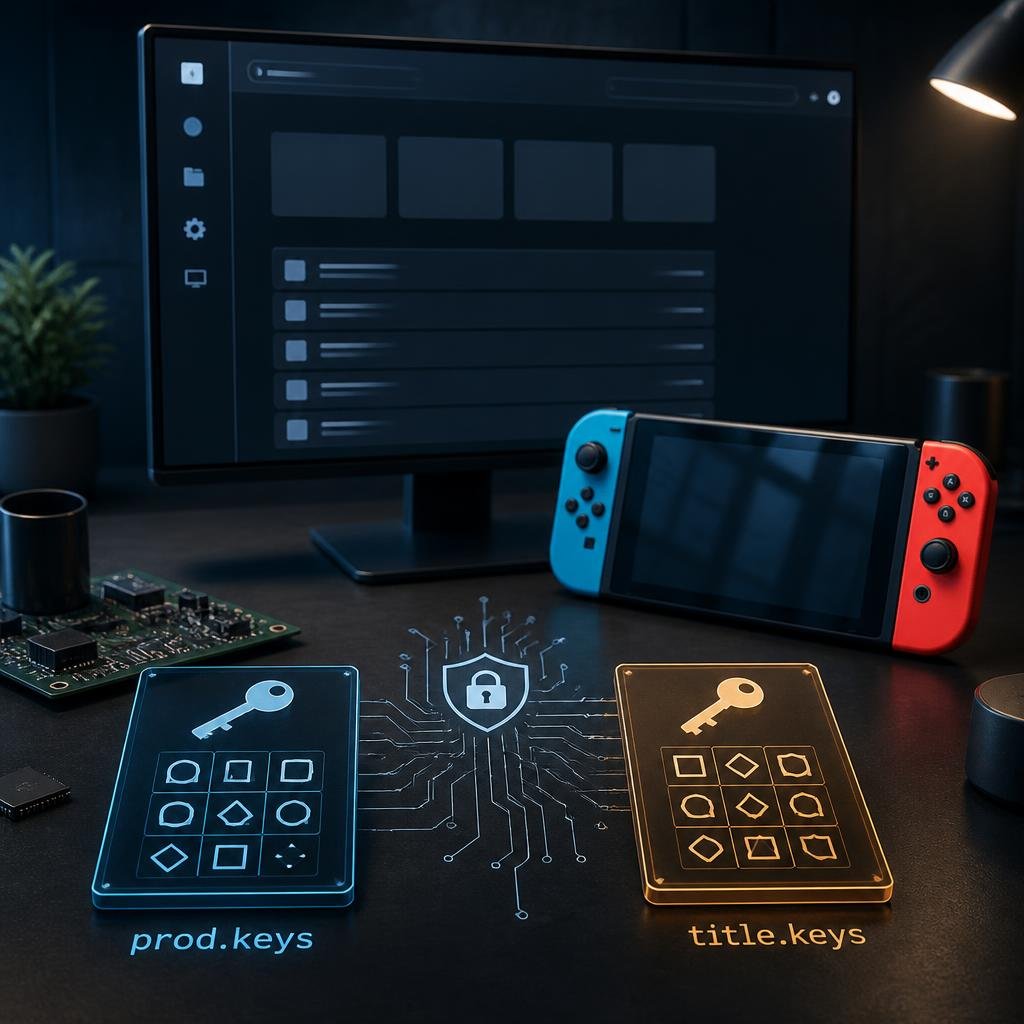
Nintendo Switch emulation mein prod.keys, title.keys, key generations, firmware, and encryption keys jaise terms frequently appear hote hain. Agar aap emulation ke basics se familiar nahi hain, to ye terminology confusing ho sakti hai.
At a high level, Nintendo Switch keys are cryptographic key material associated with the Switch’s security and encrypted-content system. Different key types have different roles, which is why prod.keys and title.keys ko ek hi cheez samajhna technically correct nahi hai.
In this guide, we’ll explain what Nintendo Switch keys are, what prod.keys and title.keys mean, how keys relate to firmware, why key errors happen, and how to troubleshoot them without relying on random third-party files.
Important: This article is a technical explanation of Nintendo Switch key terminology and emulator troubleshooting. It does not provide copyrighted cryptographic keys or third-party key downloads. Keys should be obtained from hardware and software you are legally entitled to use.
What Are Nintendo Switch Keys?
Nintendo Switch keys are cryptographic values used as part of the console’s security system to protect and process encrypted system and game content.
When Nintendo Switch software is stored or distributed in encrypted formats, the system needs the appropriate cryptographic information to process that content.
This is where different key categories come into the picture.
The two names you’ll encounter most often are:
prod.keystitle.keys
They don’t perform exactly the same function.
In emulator-related workflows, these key files may be used alongside Nintendo Switch firmware and encrypted game content.
Technical documentation for Switch content tools also distinguishes between general key material and title-key records rather than treating every key as one universal file.
What Is prod.keys?
prod.keys is a file containing a collection of Nintendo Switch production/system cryptographic keys.
Rather than representing one single key, the file can contain multiple key types used for different cryptographic operations.
For example, Switch key documentation and emulator guides commonly discuss master keys, key-area encryption keys, header-related keys, and other system-level cryptographic material as part of the broader keyset.
This is why the term prod.keys can be misleading to beginners.
It isn’t simply:
“one key that unlocks everything.”
Instead, it’s a keyset containing multiple pieces of cryptographic material.
What Is title.keys?
title.keys is different.
It is a format for storing title-specific key records.
As explained in our dedicated Title Keys guide, the format can represent relationships between a Rights ID and its corresponding title-key information.
This makes title.keys different from the broader prod.keys keyset.
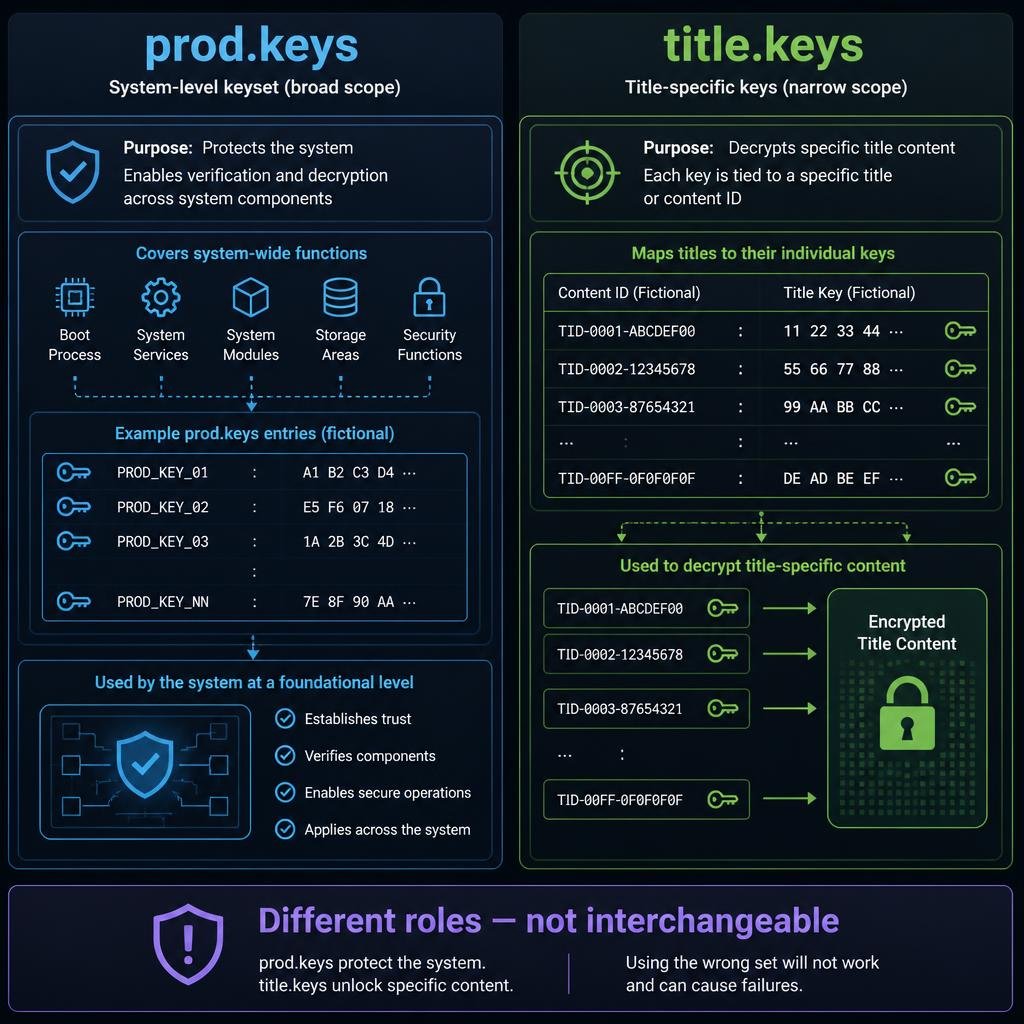
In simple terms:
prod.keys → broader system cryptographic key material
title.keys → title-specific key records
This distinction is one of the most important things to understand when troubleshooting Nintendo Switch emulator key errors.
Nintendo Switch Keys vs Firmware
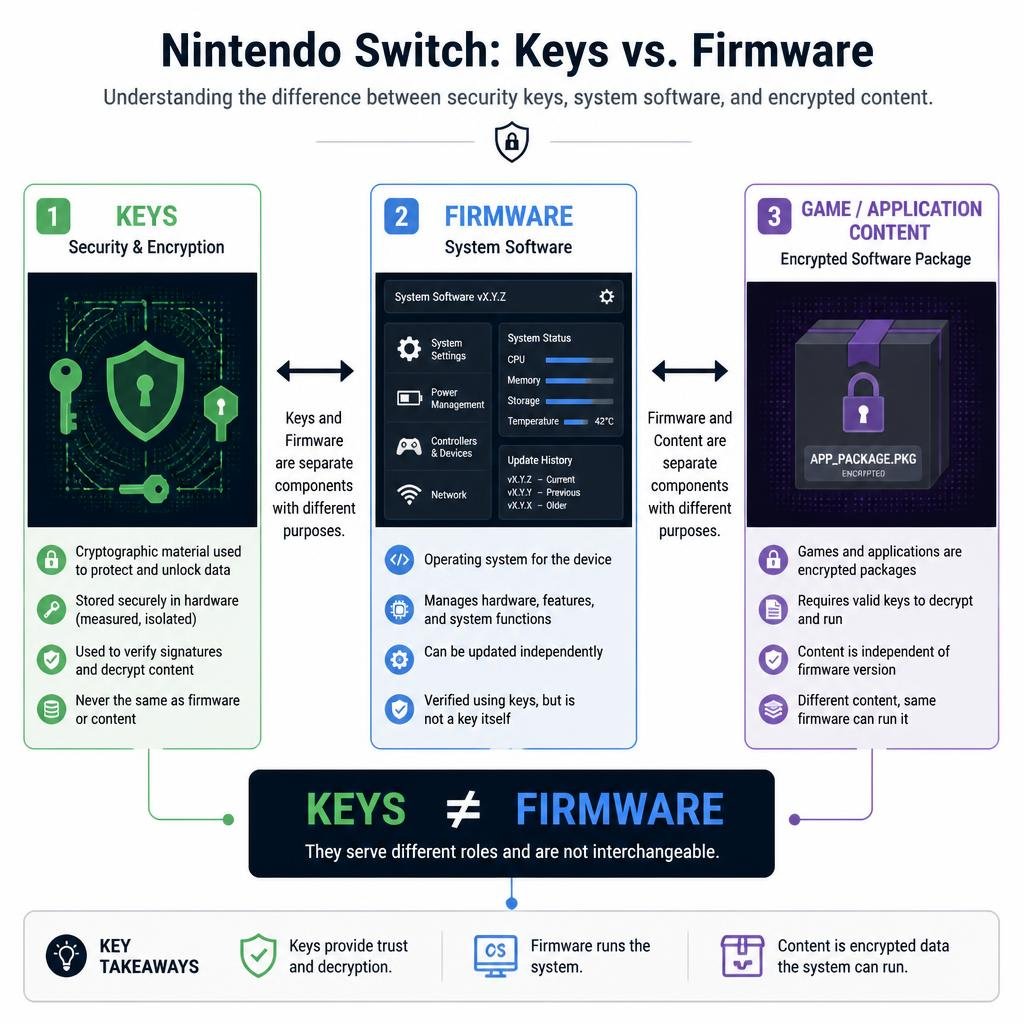
One of the biggest mistakes beginners make is treating keys and firmware as the same thing.
They aren’t.
Keys
Keys provide cryptographic information needed to process encrypted content.
Firmware
Firmware is the Nintendo Switch system software environment.
The firmware package contains system components and services that software can depend on at runtime.
For example, our Ryujinx Prod Keys and Firmware guide explains the distinction in the context of Ryujinx.
Our Eden Prod Keys and Firmware guide covers the same general relationship from the Eden perspective.
Simple comparison
| Component | Main role |
|---|---|
prod.keys | Broader cryptographic keyset |
title.keys | Title-specific key records |
| Firmware | Nintendo Switch system software/environment |
| NSP/XCI | Switch content formats |
| NCA | Nintendo Content Archive |
Understanding these differences makes emulator troubleshooting much easier.
Why Does Nintendo Switch Emulation Need Keys?
Nintendo Switch software uses encryption as part of its security architecture.
An emulator running on another platform doesn’t have access to the exact physical hardware environment of a Nintendo Switch.
Therefore, compatible emulator software needs to reproduce the relevant parts of the system’s software and cryptographic environment.
This is why emulator setup documentation commonly discusses:
- Keys
- Firmware
- Game content
- System configuration
For example, EmuDeck’s Yuzu documentation historically described prod.keys and title.keys as part of the required setup for processing Switch ROMs, while firmware was separately relevant to games that depended on system components.
The exact requirements can vary by emulator and version, so don’t assume every emulator handles keys identically.
What Is the Difference Between prod.keys and title.keys?
This is probably the most important comparison in the entire topic.
| Feature | prod.keys | title.keys |
|---|---|---|
| Purpose | Broader cryptographic keyset | Title-specific key records |
| Scope | System/content encryption workflows | Specific title-related key information |
| File name | prod.keys | title.keys |
| Interchangeable? | No | No |
| Related to firmware? | Separate | Separate |
| Used in emulator workflows? | Yes, depending on emulator | Yes, depending on emulator/content |
The important thing is that neither file should simply be treated as a renamed version of the other.
Our Title Keys Explained article goes deeper into the technical difference.
What Are Switch Key Generations?
Another term you’ll see in Nintendo Switch emulation is key generation.
A key generation refers to a particular generation of cryptographic key material associated with the Switch’s security system.
As Nintendo released newer firmware versions, additional cryptographic material became relevant to newer software.
This is why people often search for terms such as:
- Switch keys
- latest prod.keys
- key generation
- firmware keys
19.0.1 key20.x keys- newer Switch keys
However, a search query containing a specific firmware number doesn’t necessarily mean that there is one single “key” for that version.
A keyset can contain multiple generations of cryptographic information.
That’s why version-specific key searches should not automatically be interpreted as a request for one individual key value.
Do Nintendo Switch Keys Need to Match Firmware?
This is a more complicated question than many download-focused websites suggest.
Different key generations and firmware versions can affect compatibility, but it would be misleading to say:
“Every prod.keys file must exactly match the firmware version.”
The relationship between keys, firmware, and encrypted content depends on the emulator, content, and cryptographic requirements involved.
For example, TechPlayGuide’s existing Ryujinx guide discusses how different key material and firmware fit into the emulator’s setup rather than treating them as one interchangeable component.
The better troubleshooting approach
Instead of asking:
“Do my keys have the same version number as my firmware?”
Ask:
“Does my emulator have the key material and firmware components required for this content and emulator version?”
That’s a much more useful question.
Why Do Nintendo Switch Key Errors Happen?
Key errors can have several different causes.
1. Missing key material
The emulator may not have the cryptographic information required to process a particular encrypted file.
2. Outdated keyset
Your keyset may not contain the relevant newer key generation.
3. Incorrect file location
The emulator may not be checking the directory where the key file was placed.
4. Incorrect file format
A file can have the correct-looking name while still being invalid, incomplete, or incorrectly formatted.
5. Firmware problem
Sometimes the problem isn’t the keys at all.
The emulator may be missing required firmware components.
6. Emulator-specific behavior
Different emulators can implement key handling differently.
This is why a configuration that works in one emulator should not automatically be copied to another.
What Does “Encryption Keys Are Missing” Mean?
If an emulator displays an error such as:
“Encryption keys are missing”
it generally means the software cannot access the cryptographic information it needs to process the relevant encrypted content.
However, that doesn’t automatically tell you which specific key is missing.
The error could be related to:
prod.keystitle.keys- key generation
- firmware
- encrypted content
- emulator configuration
So don’t immediately replace every file.
First identify what the emulator is actually reporting.
What Does “Key Not Found” Mean?
A key not found message generally indicates that the emulator attempted to locate required cryptographic information but couldn’t find a usable matching record.
There are several possibilities:
- The keyset is incomplete.
- The key is from an incompatible generation.
- The file isn’t in the expected directory.
- The emulator isn’t loading the file.
- The content requires information that isn’t available.
- The problem is actually related to firmware or content configuration.
The exact error message matters.
Why Does One Game Work While Another Doesn’t?
This is a common question.
If one game launches successfully while another reports a key error, that doesn’t necessarily mean your entire key setup is broken.
Different content can have different encryption requirements.
A particular title, update, DLC package, or content revision may require cryptographic information that another title doesn’t use in the same way.
This is why troubleshooting should focus on the specific content that fails, rather than assuming the entire emulator installation is broken.
Can You Use title.keys Instead of prod.keys?
No.
They aren’t interchangeable.
prod.keys is a broader keyset, while title.keys is a format for title-specific key records.
Replacing one with the other won’t magically provide the cryptographic information the emulator is missing.
If you’re specifically confused about title.keys, read our full Title Keys (title.keys) Explained guide.
Are Nintendo Switch Keys the Same for Every Emulator?
Not necessarily.
Different emulators can:
- Store keys in different directories.
- Provide different key-management interfaces.
- Support different key formats.
- Handle firmware differently.
- Display different error messages.
- Have different compatibility requirements.
This is why emulator-specific documentation is important.
For example, TechPlayGuide already has dedicated guides for:
This general article should be used for understanding Nintendo Switch keys as a concept, while those articles cover emulator-specific workflows.
Nintendo Switch Keys and Yuzu
Yuzu-related documentation historically used both prod.keys and title.keys as part of its Switch content setup. EmuDeck’s Yuzu documentation also described these files in relation to decrypting ROMs and separately discussed firmware requirements.
However, Yuzu’s development status and the ecosystem around its successors have changed over time.
Therefore, older Yuzu tutorials can contain instructions that don’t apply directly to modern Switch emulators.
Don’t blindly follow an old Yuzu tutorial for another emulator.
Nintendo Switch Keys and Ryujinx
Ryujinx is another emulator where key terminology frequently appears.
Our Ryujinx Prod Keys and Firmware guide covers the emulator-specific relationship between prod.keys, title.keys, and firmware.
The important point here is that Ryujinx-specific instructions belong in the Ryujinx guide, not in a general Nintendo Switch keys article.
This helps prevent duplicate content and keeps each article focused on a distinct search intent.
Nintendo Switch Keys and Eden
Eden is another emulator where users commonly encounter key and firmware terminology.
Our Eden Prod Keys and Firmware guide covers Eden-specific setup and explains how keys and firmware fit into that environment.
Again, the general principle remains:
Keys and firmware have different jobs.
How to Troubleshoot Nintendo Switch Key Errors
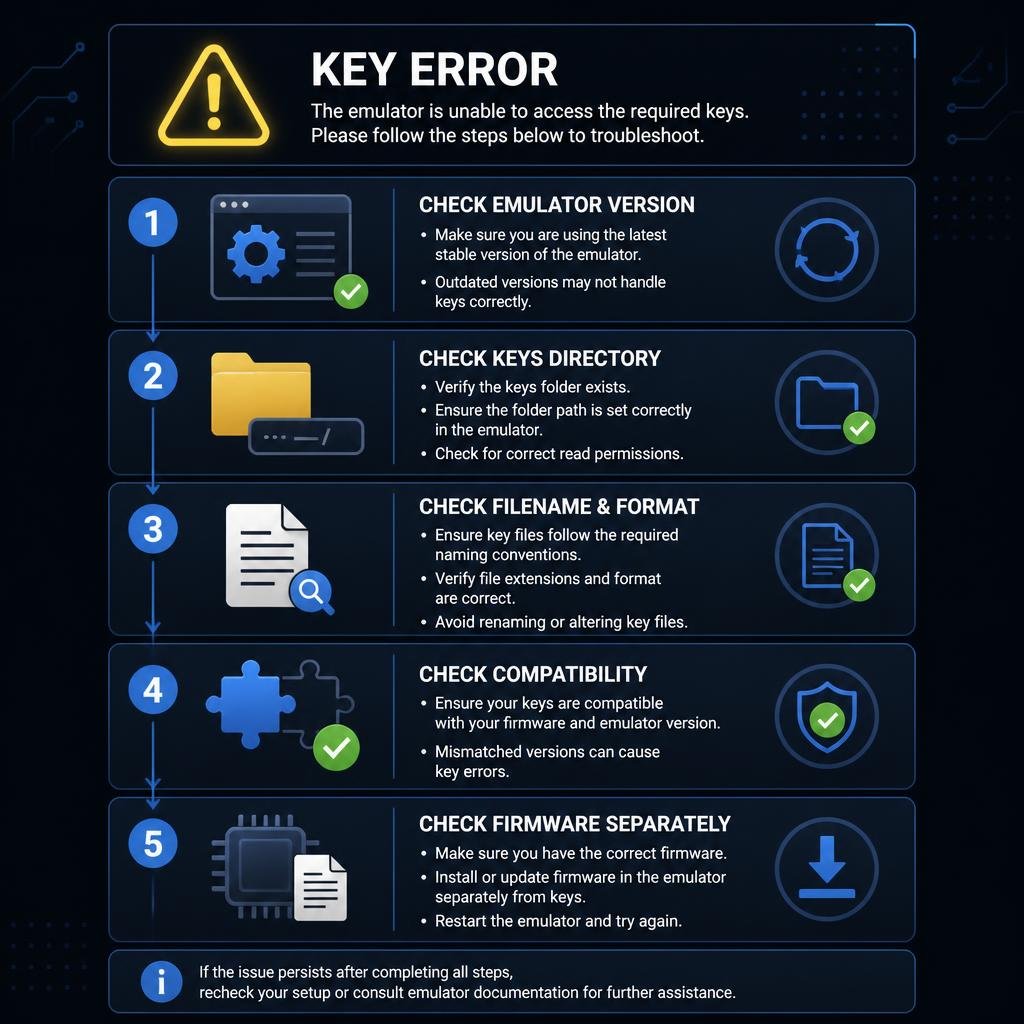
If your emulator reports a key-related problem, use this process.
Step 1: Read the complete error
Don’t focus only on the word “key.”
Look for references to:
- Missing keys
- Decryption
- Firmware
- NCA
- Content
- Key generation
- Invalid data
Step 2: Identify your emulator
Determine whether you’re using:
- Ryujinx
- Eden
- Yuzu
- Another compatible emulator
Then follow documentation for that specific application.
Step 3: Check the key directory
Make sure the emulator is actually configured to read the directory containing your key files.
Step 4: Verify the filenames
For example:
prod.keys
and
title.keys
are different filenames.
Also check that your operating system hasn’t accidentally added an extra extension such as .txt.
Step 5: Check the keyset
A file existing in the correct directory doesn’t necessarily mean it contains the required key material.
Step 6: Check firmware separately
If the keys appear to be recognized but the content still fails, investigate firmware requirements.
Step 7: Don’t replace everything at once
Changing keys, firmware, emulator versions, and configuration simultaneously makes troubleshooting much harder.
Change one variable at a time.
Should You Download Nintendo Switch Keys From the Internet?
We don’t recommend relying on random third-party websites for copyrighted Nintendo cryptographic key files.
Apart from legal concerns, third-party files can also be:
- Outdated
- Incomplete
- Modified
- Incorrectly labeled
- Unrelated to the emulator version you’re using
For legitimate personal emulation, use key material obtained from hardware and software you are legally entitled to use.
The purpose of this article is to explain what the different key types mean and how to troubleshoot them, not to distribute key files.
Why “Latest Nintendo Switch Keys” Can Be Misleading
You may see websites advertising a single “latest Switch key.”
Technically, that wording can be misleading.
A Switch keyset isn’t necessarily one individual cryptographic value.
It can contain many types of key material and multiple generations.
So when someone says:
“You need the latest key.”
the more useful question is:
Which key material does the emulator or content actually require?
This distinction helps prevent unnecessary updates and random file replacements.
Nintendo Switch Keys, Firmware, and Game Files: How They Fit Together
Think of the emulator environment as several separate components:
1. Emulator
Provides the software that emulates Switch hardware and system behavior.
2. Keys
Provide cryptographic information needed to process encrypted content.
3. Firmware
Provides Switch system software and services required by supported games.
4. Game Content
Contains the actual software being processed by the emulator.
These components interact, but they aren’t interchangeable.
Common Mistakes With Nintendo Switch Keys
Mistake 1: Thinking prod.keys and title.keys are identical
They’re not.
Mistake 2: Assuming every game requires the same keys
Different content can have different requirements.
Mistake 3: Treating firmware as a key
Firmware is system software, not a replacement for cryptographic key material.
Mistake 4: Using random files because they have a newer version number
A newer filename doesn’t automatically mean the file is correct or trustworthy.
Mistake 5: Following instructions for the wrong emulator
Ryujinx, Eden, Yuzu, and other emulators can handle configuration differently.
Mistake 6: Changing everything simultaneously
If you replace the emulator, firmware, keys, and configuration at the same time, you won’t know which change fixed or caused the problem.
Frequently Asked Questions
What are Nintendo Switch keys?
Nintendo Switch keys are cryptographic key material used as part of the Switch’s security and encrypted-content system. Different key types serve different purposes.
What is prod.keys?
prod.keys is a keyset containing multiple types of Nintendo Switch production/system cryptographic key material.
What is title.keys?
title.keys is a format containing title-specific key records. It is different from the broader prod.keys keyset.
Are prod.keys and title.keys the same?
No. They represent different categories of cryptographic information and are not interchangeable.
Do Nintendo Switch emulators need keys?
Many Switch emulation workflows require appropriate key material to process encrypted Switch content, but exact requirements vary by emulator, version, and content.
Do Nintendo Switch keys need firmware?
Keys and firmware are separate components. Keys provide cryptographic information, while firmware provides the Switch system software environment.
Why does my emulator say encryption keys are missing?
It can mean that required key material isn’t available or isn’t being recognized. Incorrect file location, unsupported key data, firmware issues, or content-specific requirements can also be involved.
Why does one Switch game work while another doesn’t?
Different titles or content revisions can have different cryptographic requirements. A game-specific failure doesn’t necessarily mean the entire emulator key setup is broken.
Can I use title.keys instead of prod.keys?
No. The two files serve different purposes.
Are Nintendo Switch keys universal across all emulators?
No. Different emulators can implement key handling and configuration differently.
Should I use the newest key file available online?
Not automatically. Version labels alone don’t establish that a file is correct, complete, or appropriate for your emulator.
Final Thoughts
Nintendo Switch keys can seem complicated because several different concepts are often grouped under the single word “keys.”
The easiest way to remember the basics is:
prod.keys = broader system-level cryptographic keyset
title.keys = title-specific key records
Firmware = Nintendo Switch system software
Once these distinctions are clear, emulator errors become much easier to understand.
Instead of immediately searching for a newer key file, identify which component is actually causing the problem and then follow documentation for your specific emulator.
For emulator-specific help, continue with our Ryujinx Prod Keys and Firmware or Eden Prod Keys and Firmware guides.

Pingback: Yuzu Keys: 7 Essential Tips for prod.keys, title.keys & Common Errors