
If you are setting up Nintendo Switch emulation and keep seeing terms like title.keys, prod.keys, or firmware, it can be difficult to understand what each file actually does.
The title.keys file is related to title-specific encryption keys used with Nintendo Switch content. It is different from prod.keys, although both may appear together in emulator setups.
In this guide, we’ll explain what title.keys means, how it differs from prod.keys, why some games may require additional key data, and how to troubleshoot common key-related errors.
Important: This guide explains the technical role of key files. It does not provide copyrighted key files or download links. Keys should be obtained from hardware and software you are legally entitled to use.
What Is title.keys?
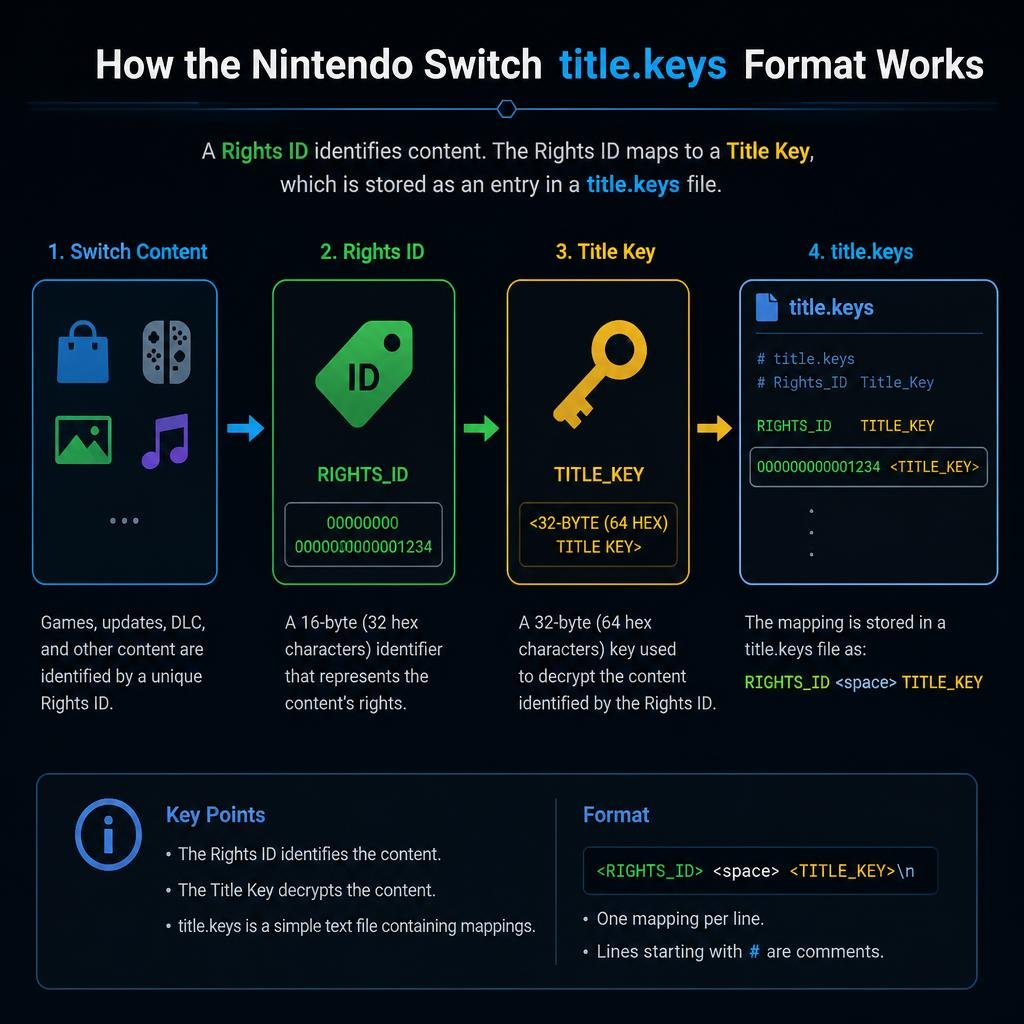
title.keys is a keyset file associated with title-specific encryption keys.
In technical documentation for Switch content tools, the title.keys format is described as a collection of Rights ID → title key pairs. This allows software to locate the appropriate title key when processing content that uses external content keys.
A simplified representation looks like this:
Rights ID = Title KeyThe actual file contains cryptographic key data, so you should never copy or publish real key values from third-party sources.
The important point is that title keys are associated with individual pieces of content, while prod.keys contains broader system-level cryptographic material.
What Is a title.keys File?
A title.keys file is essentially a text-based key database.
According to the documented title.keys format used by NSTool, each entry contains a Rights ID and its corresponding title key. The file can contain multiple entries, and the format is designed so software can find the appropriate key without requiring every ticket or key to be supplied manually.
This is why you may see title.keys mentioned alongside:
prod.keys- Nintendo Switch firmware
- NSP files
- XCI files
- NCA files
- Switch emulators
However, these files are not interchangeable.
title.keys vs prod.keys: What’s the Difference?
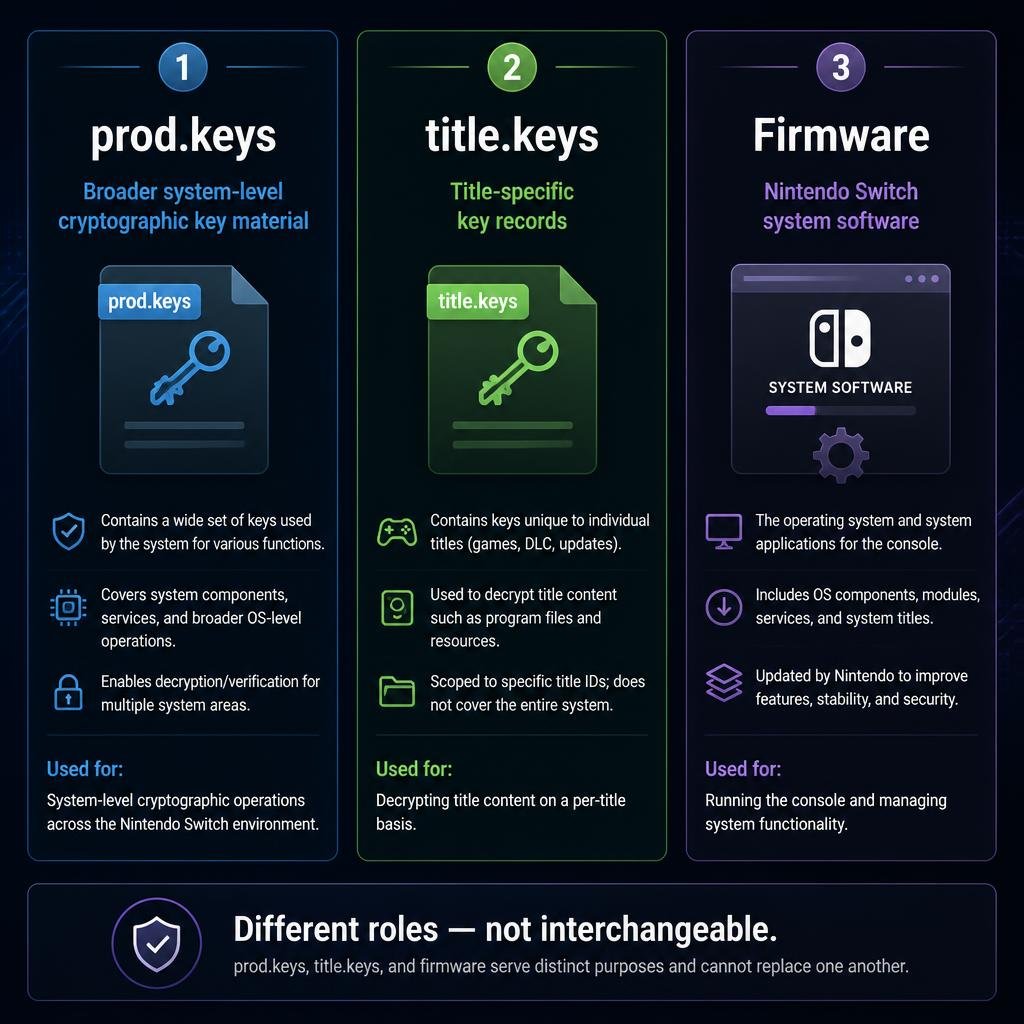
This is one of the most common points of confusion.
prod.keys
prod.keys is a broader keyset containing system-level cryptographic material used to process encrypted Nintendo Switch content.
Technical documentation for NSTool describes prod.keys as a keyfile containing various keys required for encrypted Switch file formats.
title.keys
title.keys is focused on title-specific content keys.
The documented format stores Rights ID and title-key pairs so that software can find the appropriate key for content that uses an external content key.
Simple comparison
| File | Main purpose |
|---|---|
prod.keys | Broader/system-level cryptographic keyset |
title.keys | Title-specific key records |
| Firmware | Switch system software/environment |
| Game files | Encrypted Switch content |
So, title.keys is not simply another name for prod.keys.
Why Do Nintendo Switch Emulators Use Keys?
Nintendo Switch game content is encrypted.
An emulator needs to reproduce enough of the Switch’s cryptographic and system environment to correctly process that content.
This is why emulator setups commonly mention key files and firmware.
For example, our Ryujinx Prod Keys and Firmware guide explains the relationship between prod.keys, title.keys, and firmware in a Ryujinx-specific setup.
The exact requirements can vary between emulators and versions, so you shouldn’t assume that every emulator requires exactly the same files.
Are title.keys and prod.keys Interchangeable?
No.
They represent different types of key information.
prod.keys provides broader cryptographic material, while title.keys is structured around title-specific key records.
Technical documentation for NSTool explicitly separates general keysets such as prod.keys from the title.keys format.
This distinction is important when troubleshooting because replacing one file with another will not necessarily solve a missing-key problem.
Does Every Game Need title.keys?
Not necessarily.
This is where many online guides become misleading.
Whether a separate title.keys file is needed depends on:
- The emulator
- The emulator version
- The type of content being processed
- How the content’s encryption keys are supplied
- Whether the required key information is already available through another mechanism
For example, NSTool documentation explains that external content keys can be supplied through ticket data or through the title.keys database format.
Therefore, it would be inaccurate to claim:
“Every Nintendo Switch game requires a separate title.keys file.”
The more accurate statement is that some content and software workflows use title-key information, and title.keys provides one standardized way of supplying that information.
What Is a Rights ID?
If you’ve opened documentation about title.keys, you may have seen the term Rights ID.
A Rights ID is an identifier associated with content that uses rights-managed encryption.
In a title.keys file, the Rights ID is used to identify the corresponding title-key record.
Conceptually:
Rights ID → Corresponding Title KeyThis mapping allows software to locate the appropriate title-key information when processing supported encrypted content.
You don’t need to manually calculate these values to understand how title.keys works. The important concept is simply that the Rights ID identifies the key record associated with the content.
Why Does One Game Work While Another Doesn’t?
This can happen for several reasons.
For example:
1. Different encryption requirements
Different titles can depend on different cryptographic key generations or content-key mechanisms.
2. Outdated keyset
A keyset generated from an older system environment may not contain the information required for newer content.
3. Emulator differences
Different emulators may handle keys differently.
4. Firmware mismatch
Firmware and keys serve different purposes, but both can affect compatibility.
5. Incorrect file location
Even a valid key file won’t help if the emulator isn’t looking in the directory where you’ve placed it.
If you’re troubleshooting Ryujinx, see our dedicated Ryujinx Prod Keys and Firmware guide for emulator-specific setup and troubleshooting.
For Eden, you can also read our Eden Prod Keys and Firmware guide.
Common title.keys Errors
Here are some of the most common situations users encounter.
title.keys Not Found
If an emulator or tool reports that title.keys is missing, first check whether that particular application actually requires a separate title.keys file.
Don’t immediately download a random file from the internet.
Instead:
- Check the emulator’s documentation.
- Confirm which key files the current version supports.
- Check the configured keys directory.
- Verify the filename.
- Make sure the file is readable.
- Restart the emulator after making changes.
title.keys Is Present but the Game Still Doesn’t Work
Having the file present does not automatically mean that the correct key information is available.
Possible causes include:
- Outdated key data
- Missing key records
- Incorrect key file format
- Firmware incompatibility
- Incorrect emulator configuration
- Corrupted or incomplete files
In other words, file presence and key compatibility are two different things.
Can I Just Replace title.keys With a Newer File?
Replacing files blindly is not always the best troubleshooting method.
If your emulator suddenly stops working after replacing a keyset, you may introduce a new problem rather than fix the original one.
A better approach is to determine:
What exactly is missing?
Then verify the appropriate keyset and firmware versions from your own legally obtained setup.
title.keys vs Firmware
Another common misunderstanding is thinking that title.keys and firmware perform the same job.
They don’t.
title.keys
Provides title-specific key information for supported content-processing workflows.
Firmware
Provides the Nintendo Switch system software environment and system components required by compatible software.
You can think about them this way:
Keys → help decrypt/process encrypted content
Firmware → provides the system environment
This is why emulator setup guides often discuss both keys and firmware even though they serve different purposes.
For example, our Eden Prod Keys and Firmware guide explains how keys and firmware fit into an emulator setup.
Why Online Guides About title.keys Can Be Confusing
Search for title.keys and you’ll find several different types of pages:
- Download pages
- Emulator tutorials
- Key-generation guides
- Technical documentation
- Troubleshooting articles
- Firmware guides
The problem is that many of these pages use prod.keys, title.keys, and firmware as if they’re the same thing.
They aren’t.
The safest way to understand the terminology is to separate the concepts:
| Term | Meaning |
|---|---|
prod.keys | General Switch cryptographic keyset |
title.keys | Title-specific key records |
| Firmware | Switch system software |
| NSP/XCI | Switch content formats |
| NCA | Nintendo Content Archive |
Technical documentation from the NSTool project provides a useful reference for the distinction between general keysets and title-key records.
How to Troubleshoot title.keys Problems
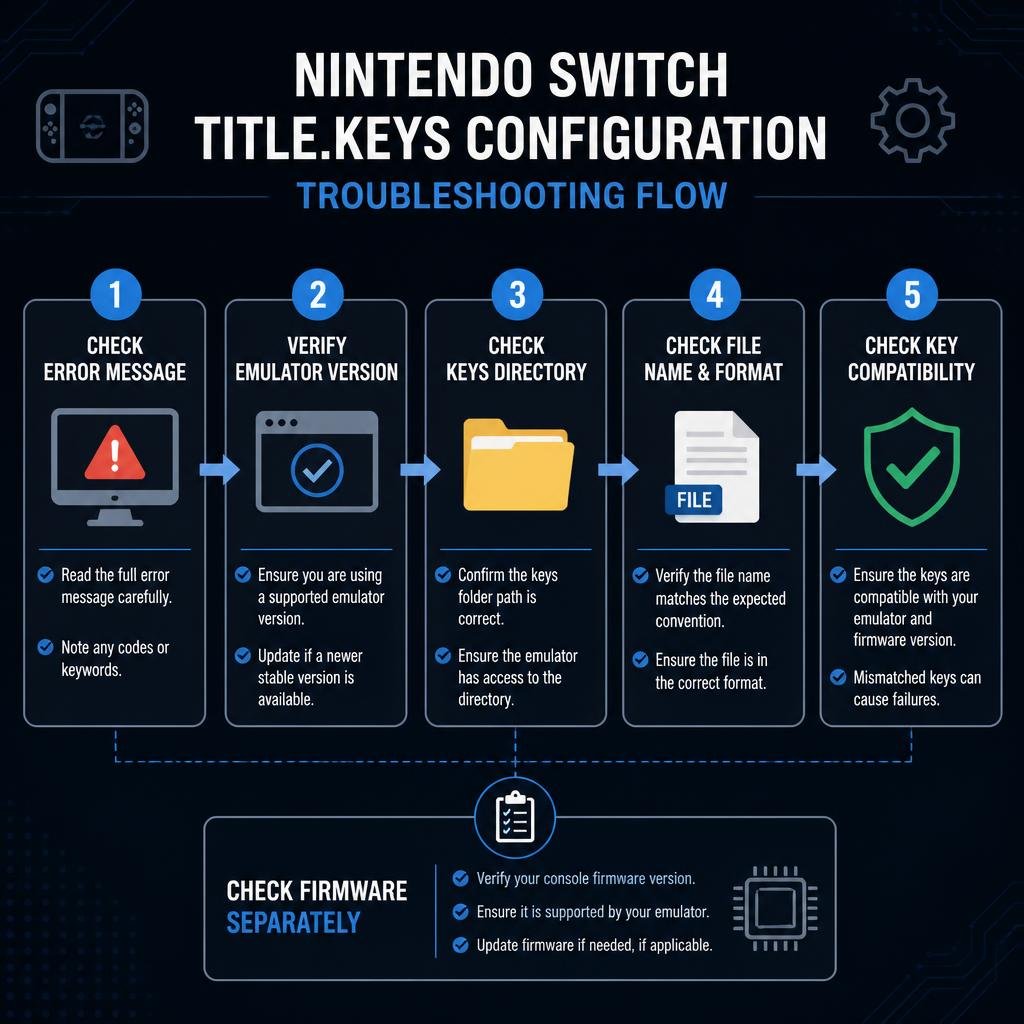
If you’re experiencing a key-related error, follow this checklist.
Step 1: Identify the exact error
Don’t start by replacing files.
Look at the complete error message and determine whether it mentions:
prod.keystitle.keys- firmware
- NCA
- content key
- missing key
- invalid key
- unsupported key revision
Step 2: Check your emulator version
The requirements can change between emulator versions.
Make sure you’re following instructions written for the version you’re actually using.
Step 3: Check the keys directory
Verify that your emulator is looking at the directory where your key files are stored.
Step 4: Check the filenames
A file accidentally named something like:
title.keys.txtis not the same as:
title.keysWindows can hide known file extensions, so this is worth checking.
Step 5: Check key compatibility
A valid-looking file isn’t necessarily compatible with every version of an emulator or every piece of content.
Step 6: Check firmware separately
If the keys appear to be working but games still fail, investigate firmware requirements separately.
Step 7: Avoid random key downloads
Third-party key files can be outdated, modified, incomplete, or legally problematic.
For your own hardware, use keys obtained through a legitimate personal-dump workflow.
Is title.keys the Same on Every Emulator?
No.
Different applications may:
- Support the format differently
- Store the file in different locations
- Require different keysets
- Handle title keys internally
- Use different configuration methods
This is why a guide written for one emulator should not automatically be applied to another.
For example, Eden and Ryujinx have their own setup requirements. You can compare their specific workflows in our:
Is title.keys Required for Ryujinx?
Ryujinx documentation and setup workflows can reference both prod.keys and title.keys, but the exact requirement can depend on the content and version being used.
Our dedicated Ryujinx Prod Keys and Firmware guide covers the Ryujinx-specific setup in more detail.
The important distinction is:
Don’t treat the generic title.keys explanation as a replacement for emulator-specific documentation.
Is title.keys Required for Eden?
The same principle applies to Eden.
Eden can use key information as part of its Switch-content decryption workflow, but the exact requirements depend on the emulator version and content.
For the complete emulator-specific explanation, see our Eden Prod Keys and Firmware guide.
Where Does title.keys Come From?
The safest approach is to obtain the required key information from hardware and software you are legally entitled to use.
We don’t recommend downloading copyrighted key files from random websites.
This article is intended to explain:
- What
title.keysmeans - How the format works
- Why emulators may use it
- How it differs from
prod.keys - How to troubleshoot configuration problems
It is not a distribution source for Nintendo cryptographic keys.
For technical reference, the NSTool key documentation documents the title.keys format and how title-key records are handled.
Frequently Asked Questions
What is title.keys?
title.keys is a keyset format that stores title-specific key records, commonly represented as Rights ID and title-key pairs.
What is the difference between title.keys and prod.keys?
prod.keys contains broader system-level cryptographic key material, while title.keys stores title-specific key records.
Is title.keys required for every Switch game?
No. Requirements depend on the emulator, version, content, and encryption/key workflow being used.
Can I use prod.keys instead of title.keys?
No. They are different types of key data and aren’t simply interchangeable.
Why does my game work without title.keys?
The emulator or content you’re using may not require a separate title.keys file for that particular workflow, or the necessary key information may be supplied through another mechanism.
Why is my title.keys file not working?
Possible causes include an incorrect file location, unsupported format, incomplete key data, outdated key information, or an unrelated firmware/emulator configuration problem.
Does firmware replace title.keys?
No. Firmware and title keys serve different purposes.
Is title.keys the same for every emulator?
Not necessarily. Different emulators can implement key handling differently.
Should I download title.keys from a third-party website?
It’s better to use key material obtained legally from hardware/software you are entitled to use rather than relying on unknown third-party files.
Final Thoughts
title.keys can look confusing because many Switch emulation guides group it together with prod.keys and firmware.
The easiest way to remember the difference is:
prod.keys = broader system cryptographic keyset
title.keys = title-specific key records
Firmware = Switch system software/environment
Once you understand that distinction, many “missing key” and emulator setup errors become much easier to diagnose.
If you’re setting up a specific emulator, don’t rely only on a generic title.keys guide. Use the emulator-specific instructions as well, because key requirements and file locations can vary between applications and versions.

Pingback: Nintendo Switch Keys Explained: 7 Essential Facts About Prod Keys
Pingback: Yuzu Keys: 7 Essential Tips for prod.keys, title.keys & Common Errors