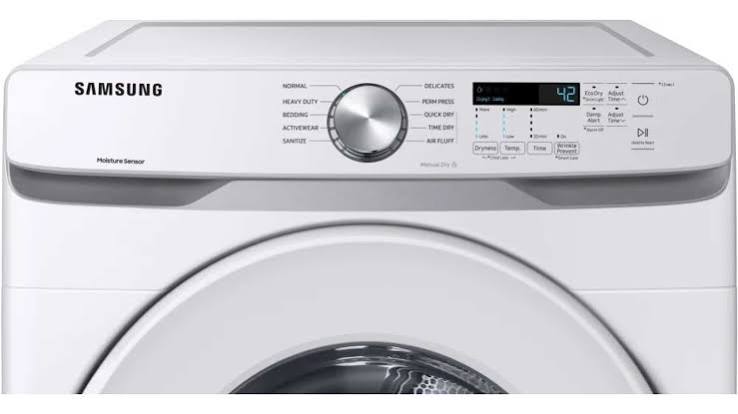
A Samsung dryer that tumbles but produces no heat, takes twice as long to dry a normal load, or stops mid-cycle is almost always a fixable problem with a standard replacement part. The four components that cover the large majority of Samsung dryer heating and operation failures are the heating element, the thermistor, the thermal fuse, and the drive belt. This guide covers all four in detail — what each part does, how to diagnose which one has failed, and how to replace it.
If your Samsung washer is also showing problems, our companion guide to Samsung washer error codes and problems covers drain pump issues, SC and 4C codes, and washer spin failures separately.
Samsung Dryer Not Heating: Diagnosis Overview
| Symptom | Most Likely Cause | DIY Fix Difficulty |
| Dryer tumbles, no heat at all | Heating element or thermal fuse failed | Moderate — requires multimeter testing |
| Dryer heats but takes very long to dry | Clogged exhaust vent OR failing thermistor | Easy (vent cleaning) to Moderate (thermistor) |
| Dryer overheating, shutting off early | Thermistor or high-limit thermostat | Moderate |
| Drum not turning, motor running | Drive belt broken | Easy to Moderate |
| Clothes damp after full cycle (no heat issue) | Moisture sensor needs cleaning or replacement | Easy |
| Dryer not starting at all | Door switch, thermal fuse, or control board | Easy (door switch) to Professional (control board) |
Samsung Dryer Heating Element
The heating element is the most commonly replaced component in a Samsung electric dryer that produces no heat. The element is a coiled wire that heats up when current passes through it, and when any section of the coil breaks, it causes an open circuit that prevents the element from generating heat. The drum will still tumble because the motor and belt system is separate from the heating circuit.
Testing the heating element
Testing the heating element requires a multimeter set to resistance (ohms). A working element will show a resistance reading — typically between 10 and 50 ohms depending on the model — while a broken element will show no continuity (open circuit or OL on the multimeter display). Testing with the machine unplugged is essential for safety.
- Locate the heating element — it is typically in a housing at the rear or the back of the drum depending on the Samsung model
- Disconnect the two wires from the element terminals
- Touch the multimeter probes to the two terminals — a reading means the element is intact; OL means it has failed and needs replacement
Replacing the Samsung dryer heating element
Samsung dryer heating elements are model-specific — the DV45H7000EW/A2 heating element, for example, differs from elements used in the DV50K8600 series. Identifying your exact model number (printed on a label inside the door frame) before ordering is essential. Replacement elements are available from Samsung Parts Direct, AppliancePartsPros, and Amazon, with aftermarket options widely available at lower prices than OEM parts for out-of-warranty machines.
Samsung Dryer Thermistor
The thermistor is a temperature sensor — a small component that measures the air temperature inside the dryer drum and communicates this to the control board, which uses the reading to regulate heat output. When the thermistor fails, it typically sends incorrect temperature readings that cause the dryer to overheat or shut off early, resulting in damp clothes at the end of a cycle even when the element and fuse are working correctly.
Symptoms of a failing Samsung dryer thermistor
- Clothes consistently damp after a full timed dry cycle
- Dryer shutting off before the cycle completes, with the drum cooling down abnormally quickly
- Dryer running but never reaching operating temperature, leaving clothes warm but not dry
Testing and replacing the thermistor
The thermistor is tested with a multimeter in the same way as the heating element — an intact thermistor will show a resistance reading that changes as the temperature changes (typically around 10,000 ohms at room temperature for Samsung models), while a failed thermistor shows either no reading or a fixed reading that does not change. Thermistor replacement is one of the more straightforward Samsung dryer repairs — the part is small, inexpensive, and typically accessible without major disassembly.
Dryer Belt for Samsung Dryer
The drive belt is a long, thin rubber belt that wraps around the drum, a tensioner pulley, and the motor pulley to rotate the drum during a cycle. When the belt breaks, the motor will run and make its normal sound but the drum will not turn. On most Samsung dryers, a broken belt can be confirmed by opening the door and trying to turn the drum by hand — a drum that spins with almost no resistance has a broken belt.
How to replace the Samsung dryer belt
- Unplug the dryer and pull it away from the wall
- Remove the top panel (typically held by two screws at the rear) and the front panel (screws at the top and bottom of the front face)
- Locate the broken belt — it may be lying in pieces at the bottom of the machine
- Thread the new belt around the drum (flat side down against the drum), then loop it around the tensioner and motor pulley — a serpentine diagram is typically included with the replacement belt
- Reassemble in reverse order and run a test cycle
Samsung dryer belts are model-specific in their length and width but broadly compatible across several Samsung model families. Confirming with the model number before purchasing is the safest approach — the DV45H7000EW/A2 and similar front-load Samsung dryers use a belt part number that is widely stocked by aftermarket suppliers.
Moisture Sensor Replacement for Samsung Dryer
Samsung dryers use two metal sensor bars inside the drum to detect moisture in the laundry — when clothes are wet, they conduct electricity between the bars, signaling the dryer to keep running. As the clothes dry, conductivity drops and the dryer ends the cycle. When the moisture sensor bars are coated with fabric softener residue or dryer sheet buildup, they can no longer accurately detect moisture, causing the dryer to end cycles early and leave clothes damp.
Cleaning vs. replacing the moisture sensor
In most cases, the moisture sensor does not need replacement — it needs cleaning. Wiping the two metal bars with a cotton ball or cloth dampened with rubbing alcohol removes the mineral and product buildup that causes inaccurate readings. This should be part of regular Samsung dryer maintenance, particularly for households that use dryer sheets in every cycle.
If cleaning does not restore accurate moisture detection, the sensor bars themselves can be replaced. The sensor assembly is typically located inside the drum on the front wall, accessible with the front panel removed, and is attached by two wires and a mounting screw or clip.
Samsung Dryer Thermal Fuse
The thermal fuse is a safety component that permanently opens — blowing like an electrical fuse — if the dryer overheats. Unlike a resettable thermostat, the thermal fuse cannot be reset once it has blown; it must be replaced. A blown thermal fuse typically causes the dryer to run but produce no heat at all, and is often the result of a restricted exhaust vent causing the machine to overheat repeatedly.
- Always check and clear the exhaust vent before replacing a blown thermal fuse — if the underlying overheating cause is not fixed, the new fuse will blow again
- The thermal fuse is tested with a multimeter set to continuity — a working fuse shows continuity; a blown fuse shows open circuit
- Thermal fuses are inexpensive and one of the easiest Samsung dryer parts to replace, typically located on or near the heating element housing
Samsung Clothes Dryer Parts: Where to Find Them
- Samsung Parts Direct — official OEM parts with model-number compatibility lookup
- AppliancePartsPros — strong stock of Samsung dryer parts with model-specific installation diagrams and video guides
- RepairClinic — symptom-based part finder, useful when you know the symptom but not the specific part number
- Amazon — wide aftermarket selection for common parts like belts, thermistors, and heating elements; always verify compatibility by model number
For Samsung dryer model-specific repair guides, see AppliancePartsPros Samsung dryer repair guides. For official Samsung dryer support and warranty claims, see the Samsung US support and service page.
Samsung Dryer Maintenance: Preventing Common Failures
Most Samsung dryer part failures are preventable with consistent maintenance. The single most important step is keeping the exhaust vent clear — a blocked or restricted vent is the root cause of thermal fuse failures, overheating shutdowns, and accelerated heating element wear. Cleaning the vent duct annually, more frequently in households with heavy laundry use or long vent runs, substantially extends the life of the heat-producing components.
• Clean the lint filter before or after every load — a clogged lint filter restricts airflow through the entire dryer, increasing the thermal load on the element and fuse
• Clean the exhaust vent duct annually using a vent brush kit — pay particular attention to bends in the duct where lint accumulates most heavily
• Clean the moisture sensor bars every two to three months with rubbing alcohol if you use dryer sheets
• Inspect the drive belt visually every few years when other repairs require the front panel to be removed — a belt showing cracking or fraying is easier to replace before it breaks entirely than after
Diagnosing Samsung Dryer Problems Systematically
The most efficient approach to a Samsung dryer that is not working correctly is to test in order of the simplest and cheapest possible cause first. Before buying any parts, confirm the following in sequence:
• Is the exhaust vent clear? — A 5 minute vent check resolves a significant proportion of heating complaints without any parts cost
• Is the lint filter clean? — A completely clogged lint filter can simulate a heating failure by preventing air circulation
• Is the door fully latched? — A door switch fault is the most common cause of a dryer that will not start at all
• Is the circuit breaker for the dryer circuit fully on? — A partially tripped 240V circuit breaker (one of the two legs tripped but not both) is a surprisingly common cause of a dryer that tumbles but does not heat, since the motor and drum can run on 120V while the heating element needs the full 240V
Working through this sequence before reaching for a multimeter or ordering parts saves significant time and money in the majority of Samsung dryer problems, since the simplest explanations are also the most common.
Samsung Dryer Model DV45H7000EW/A2: Specific Notes
The Samsung DV45H7000EW/A2 is one of the more commonly searched Samsung dryer models for parts, reflecting its widespread installation in homes over the past several years. This model uses a standard front-load design with a heating element housing at the rear accessible through the back panel. Belt replacement on this model requires front panel removal. Thermistor and thermal fuse locations are consistent with the broader Samsung front-load dryer family, and parts are well-stocked across all major parts retailers.
With consistent maintenance and the diagnostic approach outlined here, most Samsung dryer problems can be resolved without a service call, and the most common parts — belt, thermal fuse, thermistor, and heating element — are all within the repair capabilities of a DIY-comfortable homeowner with basic tools.
Use your model number as the starting point for any parts order, and you will find a well-supported ecosystem of compatible parts across every major appliance parts retailer.
Related Guides on TechPlayGuide
For more Samsung guides, see our Samsung washer error codes and problems guide.
For more Samsung guides, see our Samsung oven and appliance repair guide.
Bottom Line
| Dryer tumbles, no heat | Test heating element first (multimeter); also check thermal fuse |
| Dryer takes too long to dry | Clean exhaust vent first; then test thermistor |
| Drum not turning | Belt is broken — confirm by spinning drum by hand |
| Clothes damp, heat is fine | Clean moisture sensor bars with rubbing alcohol |
| Thermal fuse blew again after replacement | Clear exhaust vent — the root overheating cause must be fixed |
| Parts sources | AppliancePartsPros, Samsung Parts Direct, RepairClinic, Amazon |
Frequently Asked Questions
Why is my Samsung dryer not heating?
The most common reasons a Samsung dryer runs but produces no heat are a failed heating element, a blown thermal fuse, or a failed thermistor. Testing each with a multimeter in sequence — heating element first, then thermal fuse, then thermistor — identifies which part needs replacement. Always check for a blocked exhaust vent before or alongside any of these tests, since restricted airflow is the root cause of many Samsung dryer overheating failures.
How do I replace the belt on a Samsung dryer?
Replacing a Samsung dryer belt involves removing the top and front panels, locating the broken belt, and threading a new belt around the drum (flat side against the drum), the tensioner pulley, and the motor pulley. Belt replacement kits typically include a routing diagram. Confirm the replacement belt is compatible with your specific Samsung dryer model number before ordering.
What does the Samsung dryer thermistor do?
The Samsung dryer thermistor is a temperature sensor that monitors air temperature inside the drum and communicates this to the control board. A failed thermistor can cause the dryer to overheat, shut off early, or run without reaching the correct temperature, resulting in clothes that remain damp after a full cycle despite the heating element functioning correctly.
How do I clean the moisture sensor on a Samsung dryer?
The moisture sensor bars on a Samsung dryer are cleaned with a cotton ball or soft cloth dampened with rubbing alcohol, wiped across the two metal sensor bars inside the drum wall. This removes fabric softener and dryer sheet residue that causes inaccurate moisture readings and premature cycle ending. Cleaning should be done every few months as part of regular dryer maintenance.
Where can I buy Samsung dryer parts?
Samsung dryer parts including heating elements, thermistors, belts, thermal fuses, and moisture sensors are available from Samsung Parts Direct, AppliancePartsPros, RepairClinic, and Amazon. Always confirm compatibility with your exact Samsung dryer model number, which is printed on a label inside the door frame, before ordering.