You have seen them thousands of times — the vertical line (|) and the circle (O) on a rocker switch, or the circle-with-a-line power button symbol on your computer, TV, or phone charger. But what do these on/off switch symbols actually mean, where do they come from, and why are the symbols different on different types of switches? This guide explains every on and off switch symbols you are likely to encounter, from the IEC international standards that created them to specific applications on power supplies, small engines, rocker switches, and electronic devices.
The Short Answer: What Do I and O Mean on a Switch?
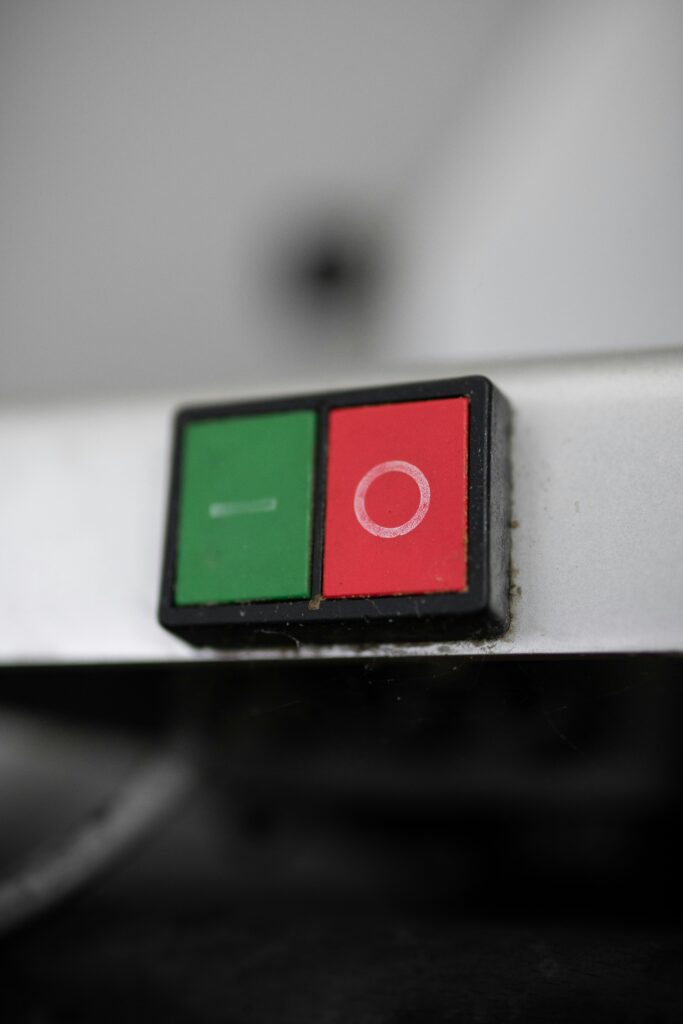
On a standard on/off switch, I means ON and O means OFF.
These symbols come from the binary number system used in electronics: 1 (represented by a vertical line, |, stylized as I) means the circuit is active/on; 0 (represented by a circle, O) means the circuit is inactive/off. This convention is standardized internationally by the International Electrotechnical Commission (IEC) under standard IEC 60417, which is why you see the same symbols on devices manufactured anywhere in the world.
The reason symbols are used instead of the words ON and OFF is practical: a single set of symbols works across every language, eliminating the need for manufacturers to produce different switch labels for every market.
All On/Off Switch Symbols: Complete Reference
| Symbol | Name | Meaning | Where You’ll See It |
| I (|) | IEC On / Binary 1 | Power ON — circuit is active and current is flowing | Rocker switches, power strips, PSU switches, small engines, appliances |
| O (0) | IEC Off / Binary 0 | Power OFF — circuit is open and no current flows | Rocker switches, power strips, PSU switches, small engines, appliances |
| ⏻ | Power symbol (IEC 60417-5009) | Standby or soft power toggle — pressing turns device on from standby or puts it into standby | Computers, TVs, monitors, phones, remote controls |
| ⏼ | Power on symbol (IEC 60417-5010) | Hard power ON — device is fully powered, not standby | Dedicated power-on buttons; some monitors and audio equipment |
| ⏽ | Power off symbol (IEC 60417-5011) | Hard power OFF — device fully disconnected from power | Dedicated power-off buttons; some monitors and audio equipment |
| ⎋ | Toggle power (circle with line inside) | Power toggle — same as ⏻ on many devices; combined on/off | Older electronics; some keyboards |
| — (line) | On position (momentary) | Switch is in the ON or closed position | Circuit diagrams; some European devices |
| · (dot) | Off position (momentary) | Switch is in the OFF or open position | Circuit diagrams; schematic notation |
The I and O Symbols in Detail
Why Is I = On?
The I symbol (a vertical line, |) represents the binary digit 1, which in electronics indicates a closed circuit — current is flowing, the device is active, power is on. The vertical line visually resembles the digit 1. When you press the side of a rocker switch marked I (or |), you are closing the circuit and allowing electricity to flow.
In IEC 60417, this is officially Symbol 5007 (ON — indicating the live or power-on state of a supply or device).
Why Is O = Off?
The O symbol (a circle) represents the binary digit 0, which in electronics indicates an open circuit — no current is flowing, the device is inactive, power is off. The circle visually resembles the digit 0. When you press the side of a rocker switch marked O, you are opening the circuit and stopping electricity from flowing.
In IEC 60417, this is officially Symbol 5008 (OFF — indicating the off or power-removed state of a supply or device).
Memory Tip: How to Remember Which Is Which
I = 1 = ON (I looks like the number 1, and 1 in binary means active/on)
O = 0 = OFF (O looks like the number 0, and 0 in binary means inactive/off)
Alternatively: Think of I as a standing person (upright, active) and O as a sleeping person (circular, curved, resting/off). Or simply: I is a straight line with no breaks — like an unbroken circuit.
The Power Button Symbol ⏻ — Why Is It Different?
The circular power button symbol you see on computers, televisions, phones, and most modern electronics (⏻ — a circle with a vertical line breaking through the top) is different from the simple I/O rocker switch symbols, and it means something subtly different.
The power button symbol ⏻ is a combination of the I (1/on) and O (0/off) symbols merged into a single icon — a circle (representing 0/off) with a vertical line (representing 1/on) cutting through it. It represents a toggle: pressing it switches between the on and off states rather than being permanently set to one.
More specifically, in modern devices this symbol typically indicates standby mode rather than a true hard power-off. When you press the power button on a TV or computer, you are usually putting the device into a low-power standby state, not completely cutting power to it. The device continues to draw a small amount of power (to maintain settings, listen for remote control signals, etc.) even when it appears off. This is why power strips with physical I/O switches can save energy even when devices appear off — they cut the circuit completely.
The ⏻ symbol was standardized by IEC 60417 as Symbol 5009 and was added to Unicode in 2015 (U+23FB). It is now one of the most universally recognized symbols in consumer electronics.
On/Off Switch Symbols by Device Type
Power Supply Unit (PSU) On/Off Switch Symbol
Desktop computer power supply units (PSUs) have a physical rocker switch on the back panel marked with I and O. This is a hard power switch — I fully connects the PSU to mains power, O completely disconnects it.
This is distinct from the power button on your computer’s front panel (marked ⏻), which typically sends a signal to the motherboard to initiate a soft shutdown or startup without cutting mains power. When troubleshooting power issues or moving a PC, you should use the PSU switch (O) to completely disconnect from mains power — not just the front panel button.
Small Engine On/Off Switch Symbols (Stihl, Mantis, Lawn Equipment)
Small engine equipment — Stihl chainsaws and blowers, Mantis tillers, lawn mowers, motorcycles — uses the same I/O convention but often with additional positions. A three-position switch labeled I, O, and sometimes a half-circle or additional symbol typically includes:
- I (or RUN): Engine running normally
- O (or STOP): Engine kill — grounds the ignition to stop the engine
- Additional position (on some models): Choke or primer mode for cold starting
On Stihl equipment specifically, the on/off switch (sometimes called the master control lever) typically integrates the choke position — moving through STOP → RUN → CHOKE. The exact symbols vary by model; always consult your specific equipment’s manual for the correct starting sequence, as using the wrong switch position can flood the engine.
Rocker Switch On/Off Symbols
Rocker switches — the rectangular switches that rock from one side to the other — are the most common location for I/O symbols. The switch rocks toward I to close the circuit (power on) and toward O to open it (power off). On power strips, extension leads with switches, power supplies, and appliances, the I side connects power and the O side disconnects it.
Some rocker switches omit the I/O entirely and are simply labeled with the universal power symbol ⏻ on one side. In this case, pressing the side with the symbol typically turns the device on, and pressing the other side (or pressing the same side again if it is a toggle) turns it off.
Airbag On/Off Switch Symbol
Vehicles with a passenger-side airbag on/off switch (typically for use when a child seat must be placed in the front passenger seat) use a key-operated rotary switch with clear symbol labeling. The switch typically shows:
- ON position: Symbol showing an adult figure in the passenger seat with an airbag deploying (airbag active — for adult passengers)
- OFF position: Symbol showing a child seat with an X or line through the airbag (airbag deactivated — for rear-facing child seats)
These symbols are standardized by vehicle safety regulations rather than the IEC electrical standards. The airbag OFF position should only be used when a rear-facing child restraint must be placed in the front seat — always return it to ON for normal adult passenger use.
Motorcycle Fuel Tap Switch Symbols (On/Off/Reserve)
Motorcycle petcock (fuel tap) switches typically have three positions with distinct symbols:
- ON (or PRI): Standard fuel flow from the main tank
- OFF: Fuel flow closed — used when the bike is parked to prevent carburetor flooding
- RES (Reserve): Draws from the reserve portion of the tank — used when the main supply runs out
The symbols vary by motorcycle brand and era. On older Japanese motorcycles, the positions are often labeled with text (ON/OFF/RES) or with line diagrams showing fuel flow paths. Modern fuel-injected motorcycles typically eliminate the manual petcock entirely as the fuel pump handles flow management electronically.
Electrical Circuit Diagram Switch Symbols
In electrical circuit diagrams and schematics, switch symbols are different from the product symbols you see on physical devices. The standard schematic symbols are:
- Open switch (OFF): A line with a gap or angled break — indicating the circuit is open and no current flows
- Closed switch (ON): A continuous line through the switch symbol — indicating the circuit is closed and current flows
- SPST (Single Pole Single Throw): The most basic on/off switch — one input, one output, open or closed
- SPDT (Single Pole Double Throw): A changeover switch — one input switches between two outputs
These schematic symbols follow IEEE and IEC standards for electrical drawing and are used by engineers and electricians rather than appearing on consumer product switches.
Where Do On/Off Switch Symbols Come From? The IEC Standard
The I/O on/off switch symbols are standardized by the International Electrotechnical Commission (IEC) under standard IEC 60417 — a comprehensive database of graphical symbols used on equipment. The standard was originally published in the 1970s and has been updated continuously since.
The key symbols from IEC 60417 for power switching are:
| IEC Symbol # | Symbol | Official Name | Meaning |
| 5007 | I (|) | On | Supply connected; circuit active; power on |
| 5008 | O (0) | Off | Supply disconnected; circuit inactive; power off |
| 5009 | ⏻ | Standby | Switch to/from standby mode |
| 5010 | ⏼ | On (power) | Hard power on |
| 5011 | ⏽ | Off (power) | Hard power off |
These IEC symbols are adopted globally, which is why your American laptop, European power strip, Japanese appliance, and Korean television all use the same I, O, and ⏻ symbols. The international standardization was one of the IEC’s most successful practical achievements — eliminating language barriers on safety-critical controls.
On/Off Switch Symbols: Frequently Asked Questions
Which symbol means ON on a switch — I or O?
I (the vertical line) means ON. O (the circle) means OFF. This comes from the binary number system: 1 (I) means the circuit is active, and 0 (O) means the circuit is inactive. This is standardized globally by IEC 60417, Symbol 5007 (ON) and Symbol 5008 (OFF).
What does the circle with a line symbol mean on a power button?
The circle with a vertical line breaking through the top (⏻) is the IEC 60417 standby symbol (Symbol 5009). It combines the O (off/0) and I (on/1) into a single icon representing a toggle between active and standby states. On most modern devices it means the button will toggle between on and standby rather than being a hard power cut. It was added to Unicode in 2015 (U+23FB).
What is the on/off symbol on a computer power supply?
The physical rocker switch on the back of a desktop computer’s power supply unit (PSU) uses the standard I/O symbols: I is the hard ON position (mains power connected) and O is the hard OFF position (mains power disconnected). This is separate from the ⏻ power button on the front of the computer case, which sends a soft signal to the motherboard without cutting mains power.
What do the symbols mean on a Stihl chainsaw or blower switch?
Stihl equipment typically uses a master control lever with positions including STOP (engine kill, equivalent to O/off), RUN (normal operation, equivalent to I/on), and CHOKE (for cold starting). The exact symbol layout varies by model. On most Stihl chainsaws, the control switch moves through positions labeled with icons — a rabbit/hare for run, a turtle or the word STOP for off, and a symbol indicating choke. Always refer to your specific Stihl model’s manual for the correct starting procedure.
Why do some switches have I/O and others have the ⏻ symbol?
The difference reflects the type of power control. I/O switches are hard switches — they physically connect or disconnect the electrical circuit, providing a complete break when in the O position. The ⏻ symbol is used on soft switches — buttons or toggles that send a signal to the device’s electronics rather than physically breaking the circuit. Hard switches (I/O) are used on power supplies, appliances, and equipment where complete power isolation is needed. Soft switches (⏻) are used on devices with standby modes, microcontrollers, or electronics that need to manage their own shutdown process.
What does the O symbol mean on a rocker switch?
The O symbol on a rocker switch means OFF — the circuit is open and no electrical current is flowing. Pressing the O side of the rocker opens the circuit and disconnects power to the device or outlet. This is based on the binary digit 0 (zero), which represents an inactive or false state in digital and electrical systems.
Final Thoughts
On/off switch symbols are one of the most effective examples of international standardization in everyday technology. The I (1/on) and O (0/off) symbols you see on rocker switches, power strips, and appliances come from the IEC 60417 international standard and are based on binary notation — the same 1s and 0s that underlie all digital electronics. The ⏻ power button symbol is a combination of both, representing a standby toggle rather than a hard cut.The practical takeaway: if you see I, the circuit is on; if you see O, the circuit is off. If you see ⏻, the button toggles between active and standby. And if you are looking at a PSU rocker switch, using O completely disconnects mains power — which is the right choice before any hardware work on a desktop computer.